

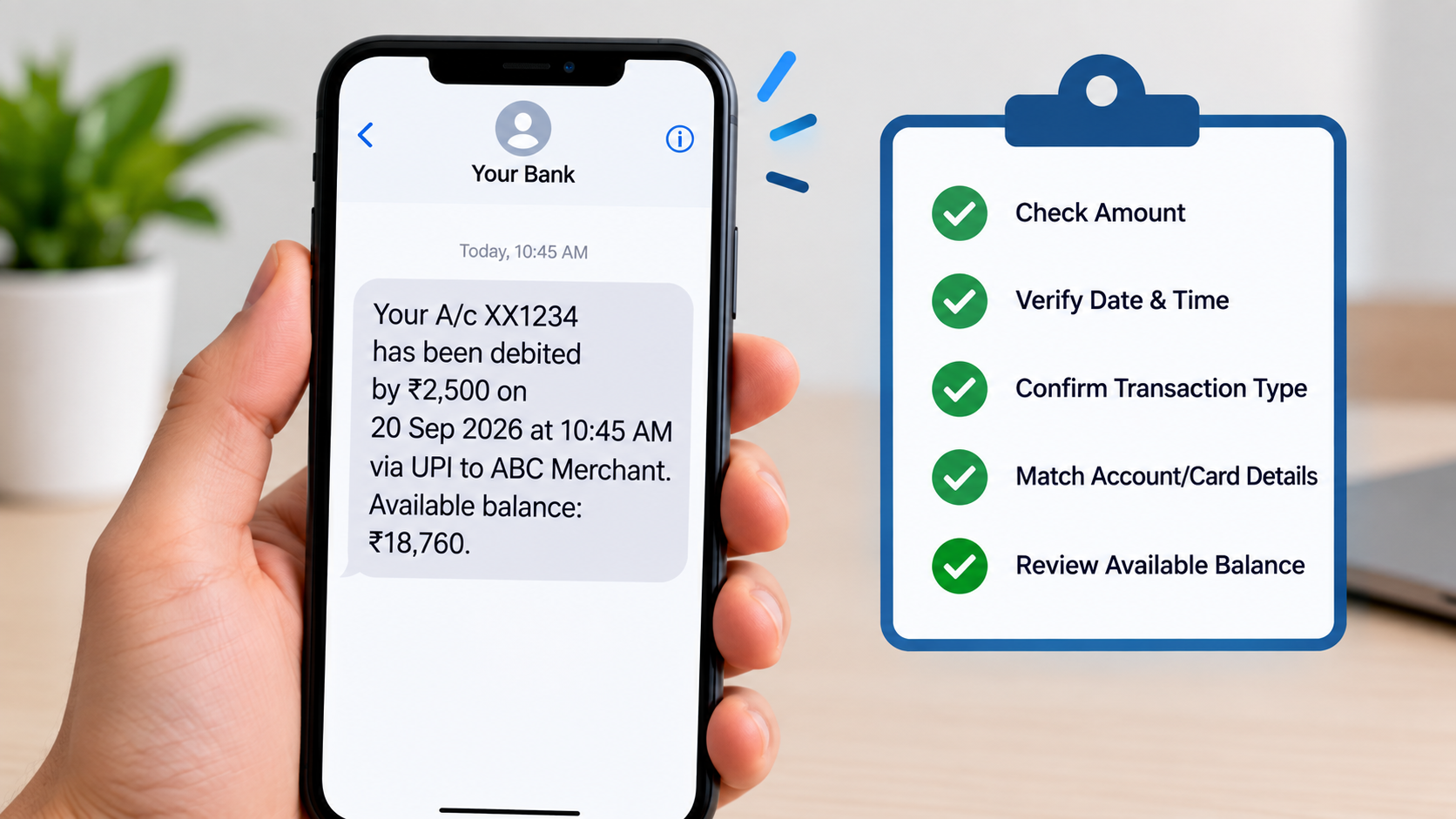
A simple SMS from your bank can help you keep track of your money. Whether you receive a message about a debit, credit, ATM withdrawal, UPI payment or account balance, these alerts can help you notice unusual activity quickly.
However, many customers ignore bank messages, overlook small transactions or assume every message claiming to be from a bank is genuine. Fraudsters may also send fake SMS messages containing suspicious links or requests for sensitive information.
That is why checking your bank SMS alerts regularly is an important part of managing your finances.
In this guide, we explain what bank SMS alerts mean, which details you should verify, how to identify suspicious messages and what to do if you notice an unauthorised transaction.
AI Answer Box: What Should You Check in Bank SMS Alerts?
Every bank customer should check the transaction amount, date and time, account or card details, transaction type and available balance shown in bank SMS alerts. Compare unfamiliar transactions with your own activity. Keep your registered mobile number updated, understand any SMS alert charges and report unauthorised transactions to your bank immediately. Never share your OTP, PIN, password or other confidential banking details with anyone.
1. Check the Transaction Amount
The first thing to verify is the amount mentioned in the SMS.
For example, if you receive a message stating that ₹2,500 has been debited from your account, check whether you made a payment of that amount.
Pay attention to:
- Unexpected debit transactions
- Multiple debits within a short period
- Small transactions you do not recognise
- Amounts that differ from your purchase receipt
- Unexpected credits or refunds
Even a small unfamiliar transaction deserves attention. Do not assume it is harmless simply because the amount is low.
2. Verify the Date and Time
Check when the transaction took place.
If the SMS shows a transaction at a time when you were not using your card, UPI or net banking, review your account activity.
Keep in mind that some messages may arrive late because of network or banking-system delays. The SMS receipt time may not always be the exact transaction time.
When something looks unusual, check the transaction history in your bank’s official mobile app or internet banking service.
3. Confirm the Transaction Type
Bank SMS alerts may refer to different types of activity, such as:
| Alert Type | What It Usually Means |
|---|---|
| Debit alert | Money has been deducted from your account |
| Credit alert | Money has been added to your account |
| ATM withdrawal | Cash has been withdrawn using an ATM |
| UPI transaction | A payment or transfer was processed through UPI |
| Card transaction | Your debit or credit card was used |
| EMI or auto-debit | A scheduled payment may have been deducted |
| Failed transaction | A transaction did not complete successfully; check whether a debit occurred |
Read the complete message rather than relying only on the amount. If you do not recognise the transaction type, verify it through an official banking channel.
4. Check the Account or Card Details
Many transaction alerts display masked account or card numbers.
For example, a message may show only the last four digits of your account or card. Check whether those digits match the account or card you used.
If you maintain multiple accounts, this can help you identify which account was involved.
Important: A message displaying your correct name or partial account number is not, by itself, proof that the SMS is genuine. Fraudsters may possess some personal information.
5. Check Your Available Balance
Some bank messages show the balance remaining after a transaction.
Compare the balance in the SMS with your recent transactions and the balance shown in your official banking app.
Differences can occur because of pending transactions, holds, fees, interest credits or delays in updating the displayed balance. If the difference cannot be explained, contact your bank.
Never rely on an SMS alone as a complete statement of your account.
6. Keep Your Registered Mobile Number Updated
Your bank sends transaction alerts to the mobile number registered with your account.
If you have changed your phone number, make sure you update it with your bank through its official process.
Check that:
- Your current mobile number is registered.
- You can receive bank messages on that number.
- Your contact details are correct for each relevant account.
- You know how to report a lost phone or suspected SIM misuse.
If you suddenly stop receiving alerts, do not ignore the issue. Check your registered contact details and ask your bank whether SMS alerts are active.
7. Understand SMS Alert Charges
Some banks may levy charges for SMS alerts, depending on the bank’s current schedule of charges, account type and applicable terms.
Check your bank’s official website, account terms or latest fee schedule to understand:
- Whether SMS alert charges apply
- How the charges are calculated
- Whether charges depend on actual usage
- Whether GST or other applicable taxes are added
- How to raise a query about an unexpected deduction
Do not assume that every bank charges the same amount. The applicable charges can vary.
For background, see the Reserve Bank of India’s guidance on charges for sending SMS alerts.
8. Know the Difference Between a Genuine Alert and a Fake SMS
Fraudsters may send messages that appear to come from a bank. These messages can claim that your account will be blocked, your KYC is incomplete or a suspicious transaction needs urgent approval.
Be cautious if a message:
- Asks you to click an unfamiliar link.
- Requests your OTP, ATM PIN, CVV or internet banking password.
- Threatens to block your account unless you act immediately.
- Asks you to install an unknown application.
- Directs you to call a number that you cannot verify.
- Promises a reward or refund in exchange for banking details.
Remember: Do not click suspicious links or share confidential banking information. Open your bank’s official app or website yourself, or contact the bank using a verified customer-care number.
9. What to Do If You Notice an Unauthorised Transaction
If you receive an alert for a transaction you did not make, act quickly.
Step 1: Contact Your Bank
Use the official customer-care number, mobile app, internet banking service or branch. Tell the bank that you suspect an unauthorised transaction.
Step 2: Block the Relevant Payment Method
If your card, UPI access or other payment method may be compromised, ask the bank how to block or secure it immediately.
Step 3: Report the Transaction
Register a complaint through the bank’s official process. Keep the complaint or reference number for future follow-up.
Step 4: Preserve the Evidence
Save the SMS, transaction details, date, time and any complaint acknowledgement. Do not delete relevant messages before recording the details.
Step 5: Report Cyber Fraud Promptly
For suspected financial cyber fraud in India, you can report it through the National Cyber Crime Reporting Portal or call the national cybercrime helpline at 1930. Report the incident as soon as possible.
RBI guidance emphasises that customers should notify their bank of unauthorised electronic transactions at the earliest. The time taken to report can affect the handling of a complaint and the customer’s potential liability under the applicable rules.
Read the RBI’s customer protection directions for unauthorised electronic banking transactions.
10. Do Not Share Your OTP or Banking Password
A bank SMS may contain an OTP for a transaction or login. Treat it as confidential.
Never share your OTP, PIN, CVV, password or other authentication details with someone claiming to be a bank employee, customer-care agent or government official.
If you receive an OTP for an action you did not initiate, do not approve the transaction. Contact your bank through an official channel and secure the relevant account or payment method.
11. What If You Are Not Receiving Bank SMS Alerts?
If alerts have stopped arriving, check the following:
- Mobile network: Make sure your phone can receive SMS messages.
- Registered number: Confirm that your current number is registered with the bank.
- Message filtering: Check whether messages are being filtered or blocked.
- Bank alert settings: Confirm that the relevant alerts are enabled, where settings are available.
- Bank support: Ask the bank to investigate if the issue continues.
Do not assume that the absence of an SMS means no transaction has taken place. Review your account through official banking channels regularly.
12. Are Bank SMS Alerts Mandatory in India?
RBI instructions require banks to ask customers to register for SMS alerts for electronic banking transactions, with SMS alerts to be sent as specified in the applicable directions. RBI’s 2017 customer-protection circular also says banks must provide channels for reporting unauthorised transactions and advise customers to report them promptly.
The precise alert arrangements and applicable requirements may depend on the type of transaction and the latest rules. Customers should check their bank’s current terms and official communications for details.
You can read the relevant RBI notification on customer protection and unauthorised electronic banking transactions.
Quick Checklist: Review Your Bank SMS Alerts
Use this checklist whenever you review your banking alerts.
-
Check the transaction amount.
-
Verify the date and time.
-
Confirm the transaction type.
-
Match the masked account or card details.
-
Review the available balance, if shown.
-
Investigate any transaction you do not recognise.
-
Keep your registered mobile number updated.
-
Check the bank’s SMS alert charges.
-
Avoid suspicious links and requests for OTPs.
-
Save complaint details if you report a transaction.
Frequently Asked Questions (FAQs)
1. What are bank SMS alerts?
Bank SMS alerts are text messages sent by a bank to inform customers about certain account activities, such as debits, credits, card transactions and other banking events.
2. Why are bank SMS alerts important?
They help customers monitor account activity and notice unfamiliar transactions quickly, allowing them to contact their bank without unnecessary delay.
3. Are bank SMS alerts mandatory in India?
RBI directions require banks to register customers for SMS alerts and send alerts as specified under the applicable rules. Customers should check their bank’s current terms for the relevant details.
4. Do banks charge for SMS alerts?
Some banks may charge for SMS alerts under their applicable fee schedules. Check your bank’s official schedule of charges for the latest information.
5. What should I do if I receive an SMS for a transaction I did not make?
Contact your bank immediately through an official channel, secure or block the relevant payment method if needed, and register a complaint.
6. Can a bank SMS be fake?
Yes. Fraudsters can send messages that imitate bank communications. Do not trust a message solely because it displays a familiar sender name or personal details.
7. Should I click links in bank SMS messages?
Avoid clicking unexpected or suspicious links. Access your bank through its official app or by typing its verified website address yourself.
8. Will my bank ask for an OTP over the phone?
Never share your OTP with a caller. If someone asks for it, end the call and contact your bank using a verified number.
9. What if I stop receiving bank SMS alerts?
Check your mobile network, registered number and message settings. If alerts still do not arrive, contact your bank to confirm that the service is active.
10. Do bank SMS alerts show the full account number?
Many transaction alerts show only masked account or card details. The exact format depends on the bank and the type of alert.
11. What should I check in a debit SMS?
Verify the amount, date, time, transaction type and account or card details. Confirm that you recognise the payment or withdrawal.
12. What should I do if my phone or SIM is lost?
Contact your mobile operator and bank promptly. Ask your bank to help secure your account and payment services, and follow its process for updating your registered number.
Published on : 27th September
Published by : SMITA
www.vizzve.com || www.vizzveservices.com
Follow us on social media: Facebook || Linkedin || Instagram
🛡 Powered by Vizzve Financial
RBI-Registered Loan Partner | 10 Lakh+ Customers | ₹600 Cr+ Disbursed