

Introduction
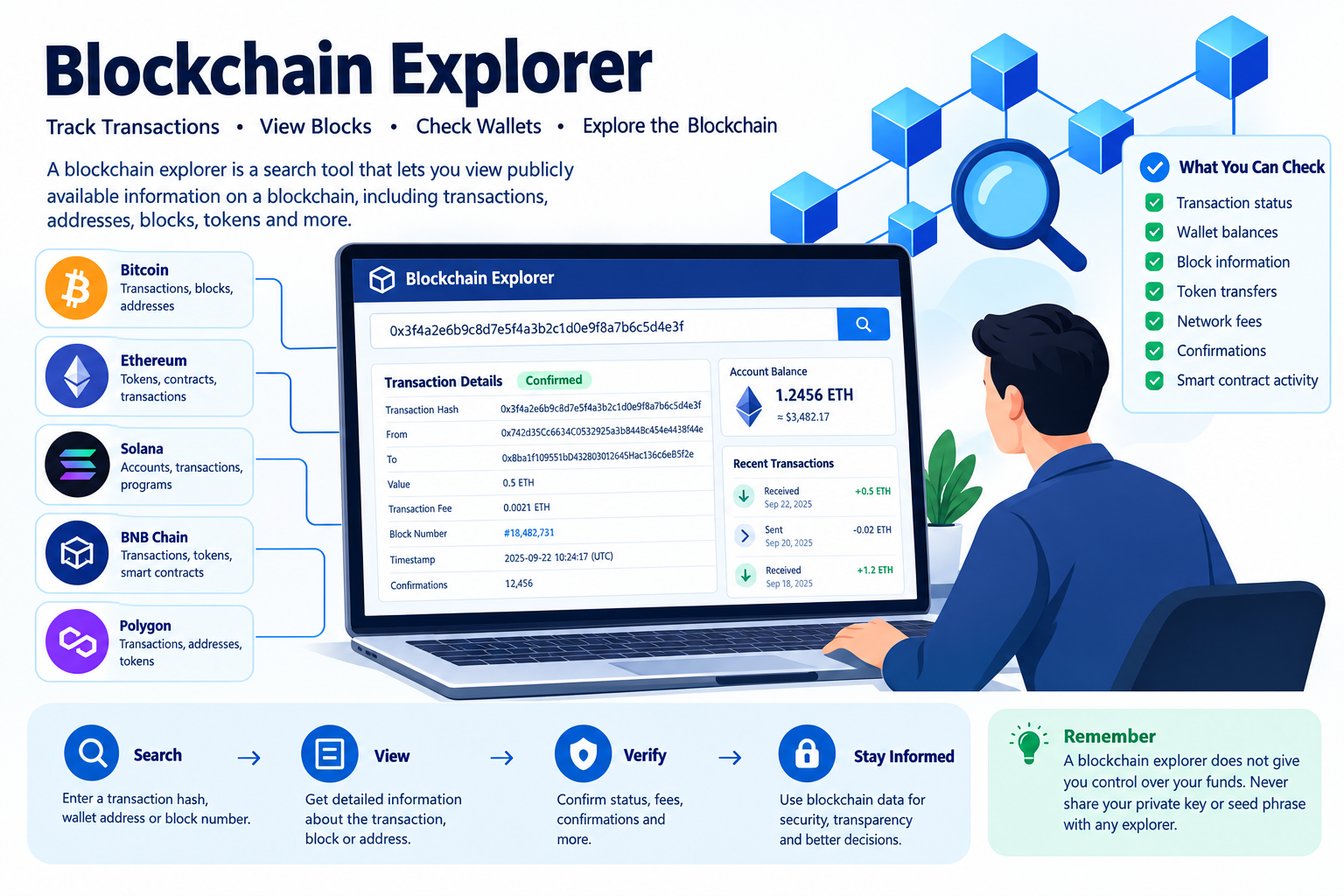
A blockchain explorer is one of the most useful tools for anyone dealing with cryptocurrency. It allows users to look at information recorded on a public blockchain, including transactions, wallet addresses, blocks, token transfers, and network activity.
Unlike a traditional bank statement, blockchain data is generally available through public networks. A blockchain explorer provides a searchable interface that makes this technical information easier to understand.
For example, if you send cryptocurrency to another wallet, you can usually use the transaction hash, also called a transaction ID or TXID, to check whether the transaction was submitted, confirmed, or failed.
Quick Answer
A blockchain explorer is a website or application that lets users search and view public blockchain data. Depending on the network, you can use it to check transaction status, wallet activity, block information, token transfers, network fees, and confirmations.
AI Answer Box: What Is a Blockchain Explorer?
A blockchain explorer is a search tool for public blockchain networks. It lets users enter a wallet address, transaction hash, block number, or token address and view publicly recorded blockchain information. Bitcoin, Ethereum, and other blockchain networks have their own explorers or compatible explorer services.
What Can You Check With a Blockchain Explorer?
- Transaction status
- Transaction confirmations
- Wallet addresses
- Cryptocurrency balances
- Token transfers
- Block numbers
- Block timestamps
- Transaction fees
- Gas fees on supported networks
- Smart-contract interactions
- Network activity
- Token contract information
AI Summary: A blockchain explorer works somewhat like a search engine for blockchain data. It does not give users control over a wallet or private keys; instead, it provides a readable view of information already recorded on a public blockchain.
What Is a Blockchain Explorer?
A blockchain explorer, sometimes called a block explorer, is a tool designed to search and display blockchain records.
Public blockchains store transactions in blocks. Those blocks are connected together to create a chronological ledger. Explorer software indexes this information and presents it through a web interface or other application.
Instead of reading raw blockchain data directly, users can enter something recognizable, such as:
- A wallet address
- Transaction hash
- Block number
- Token contract address
- ENS-style address where supported
The explorer then displays relevant blockchain information.
Why Are Blockchain Explorers Important?
Blockchain explorers make public blockchain information easier to access.
They can help users:
- Verify whether a transaction was broadcast.
- Check whether a transaction received confirmations.
- Investigate a wallet's publicly visible activity.
- Check token transfers.
- Review transaction fees.
- Inspect blocks.
- Examine smart-contract interactions on compatible networks.
This transparency is an important feature of many public blockchain systems.
How Does a Blockchain Explorer Work?
At a basic level, a blockchain explorer collects blockchain data, indexes it, and makes it searchable.
The Process
Blockchain network → Blockchain nodes → Explorer indexing → Search interface → User
When a blockchain records new transactions and blocks, explorer infrastructure can retrieve and organize that information.
A user can then search for a transaction hash such as:
0x...
on an Ethereum-compatible explorer, or use a Bitcoin transaction ID on a Bitcoin explorer.
The explorer retrieves the corresponding public information and displays it.
What Information Can You Find on a Blockchain Explorer?
The exact information varies between blockchain networks, but most explorers provide several common categories.
1. Transaction Information
A transaction page may show:
- Transaction hash
- Sender address
- Recipient address
- Amount transferred
- Timestamp
- Transaction status
- Block number
- Confirmation count
- Network fee
- Token transfers
- Gas information on supported networks
2. Wallet Address Information
Entering a public wallet address can reveal publicly available information associated with that address.
Depending on the blockchain, this can include:
- Current balance
- Transaction history
- Incoming transactions
- Outgoing transactions
- Token holdings
- Token transfers
- Contract interactions
Important: A public wallet address is not the same as a private key. Never enter a private key or seed phrase into a blockchain explorer.
3. Block Information
A block explorer can also provide information about individual blocks.
Typical details include:
- Block number
- Block hash
- Timestamp
- Transactions included
- Block producer/miner/validator information, depending on the network
- Block size or related technical data
- Network-specific metadata
How to Track a Crypto Transaction Using a Blockchain Explorer
If you have sent cryptocurrency and want to check its status, the transaction hash is usually the most useful piece of information.
Step 1: Find Your Transaction Hash
After submitting a transaction through a wallet or exchange, look for:
- Transaction ID
- TXID
- Transaction hash
- View on explorer
The terminology depends on the platform and blockchain.
Step 2: Open the Correct Blockchain Explorer
Use an explorer that supports the blockchain involved.
For example:
| Blockchain | Common Explorer |
|---|---|
| Bitcoin | Blockstream Explorer |
| Ethereum | Etherscan |
| Solana | Solana Explorer |
| BNB Chain | BscScan |
| Polygon | PolygonScan / supported Polygon explorers |
Explorer availability and interfaces can change, so verify that the explorer supports the network you're using.
Step 3: Paste the Transaction Hash
Copy the transaction hash and enter it into the explorer's search box.
Avoid manually typing long transaction hashes whenever possible because one incorrect character can lead to an invalid or unrelated search.
Step 4: Check the Status
Depending on the blockchain, you may see statuses such as:
- Pending
- Confirmed
- Successful
- Failed
- Reverted
The terminology varies between networks.
Step 5: Review the Details
Check:
- Sender
- Recipient
- Amount
- Block
- Confirmations
- Fees
- Token transfers
This can help determine what happened to the transaction.
How to Read a Blockchain Transaction Page
Blockchain explorers can look complicated at first. Here's a simple breakdown.
| Field | What It Means |
|---|---|
| Transaction Hash | Unique identifier for the transaction |
| Status | Current recorded transaction state |
| Block | Block containing the transaction |
| Timestamp | Time associated with the blockchain record |
| From | Sending address |
| To | Receiving address or contract |
| Value | Native cryptocurrency amount transferred |
| Fee | Network fee associated with the transaction |
| Confirmations | Subsequent blockchain blocks recognized after inclusion, where applicable |
| Token Transfers | Tokens moved as part of the transaction |
Expert Commentary
From a practical perspective, the transaction hash should be your starting point when troubleshooting a crypto transfer. Searching by wallet address can show many transactions, while a transaction hash points to a specific blockchain event.
Blockchain Explorer vs Crypto Wallet
These two tools are often confused, but they serve very different purposes.
| Feature | Blockchain Explorer | Crypto Wallet |
|---|---|---|
| View blockchain data | Yes | Sometimes |
| Send cryptocurrency | No | Yes |
| Receive cryptocurrency | No | Yes |
| Store private keys | No | Usually |
| View transactions | Yes | Yes |
| Search public addresses | Yes | Limited |
| Sign transactions | No | Yes |
| Check confirmations | Yes | Often |
| Browse blocks | Yes | Usually no |
Simple Explanation
A wallet helps you control and use your assets.
A blockchain explorer helps you inspect blockchain records.
An explorer generally does not give you ownership or control of funds.
Bitcoin Blockchain Explorer
Bitcoin has a large ecosystem of blockchain explorers.
A Bitcoin explorer can typically help you search for:
- Bitcoin transaction IDs
- Bitcoin addresses
- Blocks
- Fees
- Transaction inputs and outputs
- Confirmation information
Example
Suppose you send BTC to another address.
Your wallet may provide a transaction ID such as:
abc123...
You can paste that ID into a Bitcoin explorer and inspect the transaction's status and blockchain details.
Ethereum Blockchain Explorer
Ethereum explorers provide information about transactions, addresses, blocks, tokens, and smart-contract interactions.
Ethereum transactions can involve more than simply transferring ETH.
A transaction might interact with:
- Smart contracts
- Decentralized exchanges
- NFT contracts
- DeFi applications
- Token contracts
This is why Ethereum explorer pages can contain considerably more technical information than a basic cryptocurrency transfer.
What Is a Transaction Hash?
A transaction hash is a unique identifier associated with a blockchain transaction.
It can be used to locate a particular transaction in an explorer.
For example, an Ethereum transaction hash commonly looks like a long hexadecimal string beginning with 0x.
Why Is the Transaction Hash Useful?
It allows you to:
- Locate a specific transaction
- Check transaction status
- Verify the destination
- Review fees
- Check block inclusion
- Investigate token movements
- Share transaction details for troubleshooting
Never confuse a transaction hash with a private key. A transaction hash can generally be shared publicly, while private keys must remain secret.
What Does “Pending” Mean on a Blockchain Explorer?
A pending transaction generally means that the transaction has been submitted but has not yet reached the relevant finalized or confirmed state.
The exact process depends on the blockchain.
Possible reasons include:
- Network congestion
- Insufficient or inappropriate fee settings
- Validator or node processing
- Wallet-specific issues
- Transaction replacement mechanisms on some networks
Should You Panic?
Not necessarily.
First check the transaction on the correct explorer and identify its current status. If the transaction remains pending for an unusually long period, consult the wallet or exchange's official support documentation.
What Does “Failed” or “Reverted” Mean?
A failed transaction means the blockchain did not successfully complete the intended operation.
On smart-contract networks, a transaction may consume some network resources even when the intended contract operation fails.
Possible causes include:
- Contract execution failure
- Incorrect transaction parameters
- Insufficient balance
- Gas-related issues
- Contract restrictions
- Network-specific errors
The transaction page often provides additional information that can help with investigation.
Blockchain Explorer Pros and Cons
Pros
- Public blockchain data is easier to understand.
- Transactions can be independently inspected.
- Useful for troubleshooting payments.
- Helps verify transaction status.
- Makes wallet activity searchable.
- Provides transparency into blockchain activity.
- Useful for developers and researchers.
Cons
- Explorer interfaces can be confusing for beginners.
- Different networks require different explorers.
- Public addresses may reveal transaction history.
- Explorer data can be misinterpreted without blockchain knowledge.
- A transaction appearing on an explorer does not automatically prove that an off-chain business obligation has been fulfilled.
- Explorer services can experience downtime or indexing delays.
How Blockchain Explorers Help With Crypto Security
Blockchain explorers can be useful security tools, but they should not replace basic wallet security.
Before confirming a cryptocurrency payment, users should carefully check:
- Destination address
- Blockchain network
- Amount
- Token
- Transaction fee
- Contract interaction, when applicable
After sending funds, the explorer can help confirm where the transaction was recorded.
Security Rule
Never enter your seed phrase, private key, password, or wallet recovery phrase into a blockchain explorer.
A legitimate explorer generally needs only public blockchain information to display a transaction.
Real-World Uses of Blockchain Explorers
Blockchain explorers are useful beyond simply checking whether a payment arrived.
1. Payment Verification
A merchant can inspect a transaction to confirm that a payment was broadcast and recorded on-chain.
2. Troubleshooting
If a crypto transfer has not arrived, the transaction hash can help identify whether the issue is:
- Pending transaction
- Wrong network
- Incorrect address
- Failed transaction
- Token-specific issue
3. Developer Testing
Blockchain developers frequently use explorers to inspect smart-contract transactions and contract interactions.
4. Research
Analysts can study publicly visible blockchain activity to understand network usage and transaction patterns.
5. Token Verification
Explorers can help users inspect token contract addresses and transaction histories. However, users should verify token information through authoritative project documentation because similarly named tokens can exist.
Blockchain Explorer Comparison
| Explorer Type | Best For | Common Information |
|---|---|---|
| Bitcoin Explorer | Bitcoin network | BTC transactions, blocks, addresses |
| Ethereum Explorer | Ethereum | ETH, tokens, contracts, transactions |
| EVM Explorer | EVM-compatible chains | Transactions, contracts, tokens |
| Solana Explorer | Solana | SOL transactions, accounts, programs |
| Multi-chain Explorer | Multiple networks | Cross-chain search and portfolio-related information |
The exact capabilities depend on the explorer and supported blockchain.
How to Choose a Blockchain Explorer
When selecting an explorer, consider:
1. Network Support
Make sure the explorer supports the blockchain you're using.
2. Data Transparency
Look for clear transaction details and recognizable blockchain identifiers.
3. Reliability
Established explorers generally have mature indexing infrastructure, although no third-party service should be assumed to be infallible.
4. Smart-Contract Information
If you interact with DeFi or Web3 applications, contract information can be especially useful.
5. User Experience
A clean search interface makes it easier for beginners to locate transactions and addresses.
Common Blockchain Explorer Mistakes
Mistake 1: Using the Wrong Network
A transaction on one blockchain may not appear in an explorer for another network.
Solution: Confirm the network first.
Mistake 2: Searching for the Wrong Address
Copying an address incorrectly can lead to confusing results.
Solution: Copy and paste the address rather than typing it manually.
Mistake 3: Sharing Private Information
An explorer does not require your seed phrase or private key.
Solution: Never provide these credentials.
Mistake 4: Assuming “Pending” Means Lost
Pending transactions may still be processed.
Solution: Check the transaction status and network conditions before taking further action.
Mistake 5: Trusting a Token Because Its Name Looks Familiar
Scammers can create tokens with names or symbols similar to legitimate projects.
Solution: Verify contract addresses through official project sources.
Frequently Asked Questions
1. What is a blockchain explorer?
A blockchain explorer is a search tool that lets users view publicly available information from a blockchain, such as transactions, blocks, addresses, and token activity.
2. How do I check a blockchain transaction?
Find your transaction hash or TXID, open an explorer supporting the relevant blockchain, and paste the hash into its search field.
3. Is a blockchain explorer safe?
Established blockchain explorers can be useful for viewing public blockchain data. However, users should never enter private keys, passwords, or seed phrases into them.
4. Can I track a crypto transaction with a wallet address?
Yes. On many public blockchains, searching a public wallet address can display its publicly visible transaction history and balances.
5. What is a transaction hash?
A transaction hash is a unique identifier associated with a blockchain transaction. It can be used to locate the transaction on a compatible explorer.
6. Can a blockchain explorer show my identity?
Usually, explorers display blockchain addresses rather than a person's verified real-world identity. However, blockchain activity can sometimes be linked to identities through information outside the blockchain.
7. Why can't I find my transaction?
Possible reasons include using the wrong blockchain explorer, entering an incorrect transaction hash, indexing delays, or a transaction that was not successfully broadcast.
8. How long does a blockchain transaction take?
Transaction times vary significantly between blockchain networks and network conditions. Some transactions are recorded quickly, while others can take longer depending on congestion and consensus processes.
9. What does transaction confirmation mean?
A confirmation generally indicates that a transaction has been included in a block and additional blockchain activity has subsequently built on it. The exact meaning and security assumptions vary by network.
10. Can I cancel a blockchain transaction?
Cancellation depends on the blockchain and transaction state. Once a transaction is finalized, it generally cannot simply be reversed through the blockchain.
11. Can I use one explorer for every cryptocurrency?
No. Different blockchain networks have different data structures and explorer services. Some multi-chain tools support several networks, but coverage varies.
12. What is a block explorer?
A block explorer is another common name for a blockchain explorer. It allows users to inspect blocks and transactions recorded on a blockchain.
13. Can blockchain explorers track Bitcoin?
Yes. Bitcoin explorers allow users to search Bitcoin transactions, addresses, blocks, and related public blockchain data.
14. Can blockchain explorers track Ethereum tokens?
Yes. Ethereum-compatible explorers can display token transfers and smart-contract interactions when their indexing supports those assets.
15. Do blockchain explorers store my cryptocurrency?
No. A blockchain explorer is primarily a data-viewing and search tool. It does not function as your cryptocurrency wallet.
Key Takeaways
- A blockchain explorer is a search engine for blockchain data.
- You can use it to inspect transactions, addresses, blocks, tokens, and fees.
- A transaction hash/TXID is one of the easiest ways to locate a specific transaction.
- Always use an explorer compatible with the blockchain network involved.
- Public wallet addresses can expose transaction history.
- Never share private keys or seed phrases.
- A pending transaction does not necessarily mean funds are lost.
- Blockchain explorers are useful for payment verification, troubleshooting, research, and Web3 development.
- Always verify token contracts and destination addresses before sending funds.
Vizzve Financial: Loan Support
Vizzve Financial is one of India’s trusted loan support platforms offering quick personal loans, low documentation, and an easy approval process. Apply at www.vizzve.com.
If you're researching financial products online, always review applicable eligibility requirements, interest rates, fees, repayment terms, and lender disclosures before making a borrowing decision.
Conclusion
A blockchain explorer makes complex blockchain information easier to inspect. Whether you are checking a Bitcoin payment, verifying an Ethereum transaction, examining a wallet address, or investigating a token transfer, an explorer provides a transparent window into publicly recorded blockchain activity.
For beginners, the most important things to understand are the transaction hash, wallet address, block, confirmation status, and network fee. Once these concepts are familiar, reading a blockchain transaction becomes much easier.
As blockchain adoption grows, knowing how to use an explorer is becoming a practical digital skill for cryptocurrency users, developers, businesses, and researchers.
Published on : 23rd september
Published by : Siva Nagaiah
www.vizzve.com || www.vizzveservices.com
Follow us on social media: Facebook || Linkedin || Instagram
🛡 Powered by Vizzve Financial
RBI-Registered Loan Partner | 10 Lakh+ Customers | ₹600 Cr+ Disbursed
Hastags
#BlockchainExplorer #Blockchain #Cryptocurrency #Crypto #Bitcoin #Ethereum #Web3 #CryptoTransactions #BlockchainTechnology #CryptoWallet #BitcoinExplorer #EthereumExplorer #BlockExplorer #CryptoSecurity #DigitalAssets #DeFi #SmartContracts #TokenTransfer #CryptoEducation #BlockchainTechnology #Web3India #FinTech #DigitalFinance #CryptoGuide