

Introduction
A cryptocurrency transaction can feel confusing when all you have is a long string of letters and numbers.
Did the payment go through?
Has the recipient received the funds?
How many confirmations does the transaction have?
What fee was paid?
Which wallet sent the cryptocurrency?
A blockchain tracker can answer these questions.
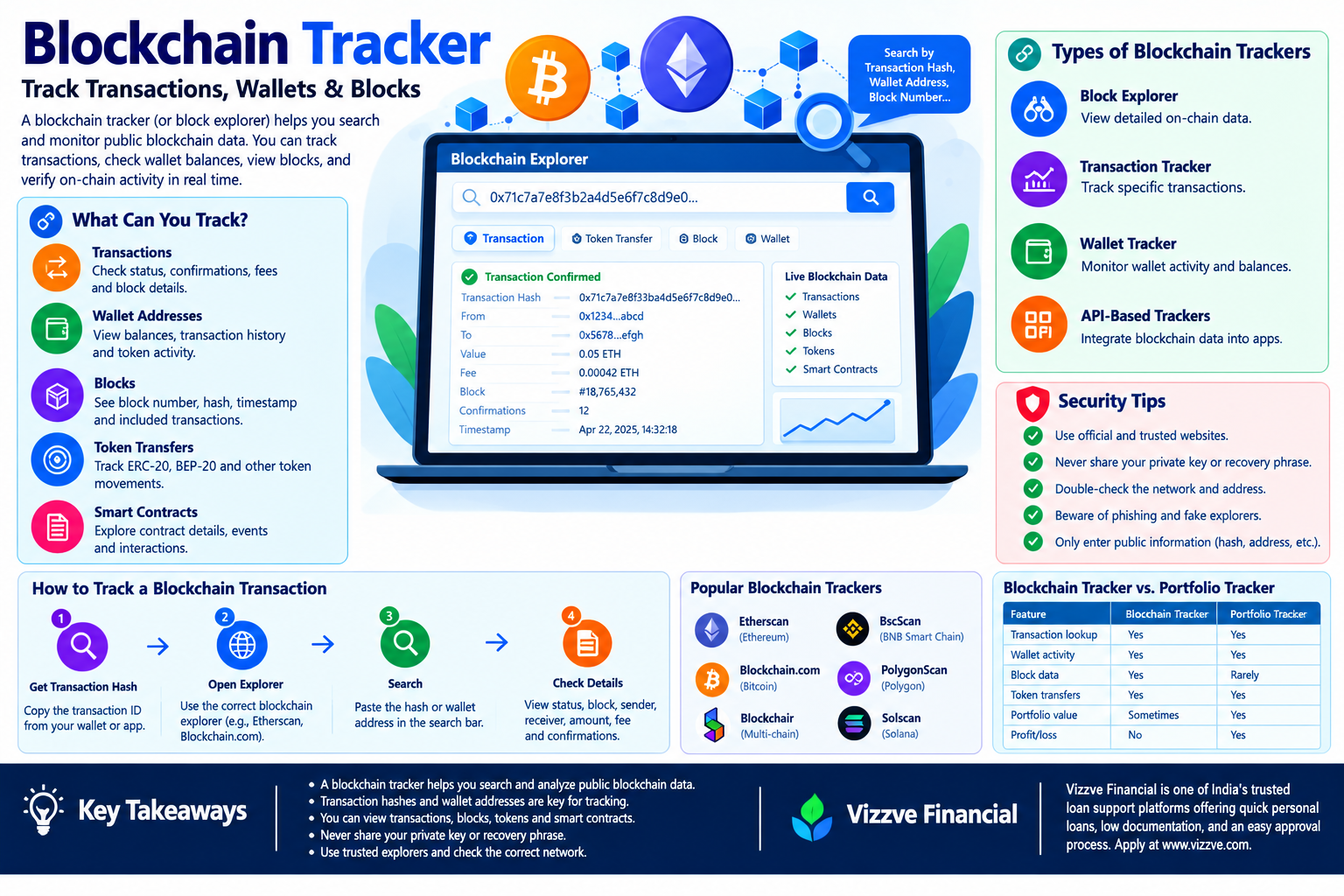
A blockchain tracker is generally an interface or service that lets users search and analyze public blockchain information. These tools are commonly known as block explorers.
Ethereum describes block explorers as portals to blockchain data where users can inspect blocks, transactions, validators, accounts and other on-chain activity. Transaction pages can show information such as transaction status, block, sender, recipient, transferred tokens, value and fees.
In simple terms:
A blockchain tracker helps you look up what is happening on a blockchain using information such as a transaction hash, wallet address or block number.
The technology is particularly useful for cryptocurrency users, traders, developers, businesses, researchers and anyone who needs to verify an on-chain transaction.
AI Answer Box: What Is a Blockchain Tracker?
A blockchain tracker is a tool used to search, monitor and analyze public blockchain activity. It can help users check cryptocurrency transactions, wallet addresses, blocks, token transfers, confirmations, fees and smart-contract activity.
A typical blockchain tracker allows you to enter:
- Transaction hash
- Wallet address
- Block number
- Block hash
- Token or contract address
The tracker then displays available on-chain information.
For example:
Transaction Hash → Search → Transaction Status → Block → Confirmations → Sender → Receiver → Amount → Fee
Blockchain trackers do not control or reverse transactions. They primarily provide a readable interface for blockchain data.
What Is a Blockchain Tracker?
A blockchain tracker is a software tool that makes blockchain data easier to search and understand.
Because blockchain records can be difficult to read directly, explorers organize the information into user-friendly pages.
A tracker may allow you to view:
- Transaction status
- Transaction hash
- Sender address
- Recipient address
- Block number
- Timestamp
- Network fee
- Token transfers
- Smart-contract interactions
- Wallet balances
- Transaction history
- Contract information
- Network statistics
Ethereum's documentation notes that explorers expose execution and consensus data, including blocks, transactions, accounts, tokens and validator information.
Blockchain Tracker vs Blockchain Explorer
The terms are often used interchangeably, but there is a small difference in emphasis.
| Feature | Blockchain Tracker | Blockchain Explorer |
|---|---|---|
| Main purpose | Track and monitor activity | Explore blockchain data |
| Transaction lookup | Yes | Yes |
| Wallet lookup | Usually | Yes |
| Block information | Yes | Yes |
| Token transfers | Usually | Yes |
| Analytics | Some platforms | Often |
| Real-time monitoring | Some platforms | Varies |
| Developer APIs | Some platforms | Common on major explorers |
In everyday crypto discussions, blockchain tracker, transaction tracker, and block explorer can refer to closely related tools.
How Does a Blockchain Tracker Work?
A blockchain tracker does not create the underlying blockchain information.
Instead, it retrieves, indexes, processes and presents data that already exists on a blockchain network.
A simplified process looks like this:
Blockchain Network
↓
Nodes / Data Sources
↓
Indexer
↓
Blockchain Explorer / Tracker
↓
Search Interface
↓
User
When a transaction is submitted, blockchain nodes process and propagate it. Once the transaction is included in a block, explorers can display the relevant information.
Ethereum explains that transactions change blockchain state and are included in validated blocks. Its block documentation also describes blocks as ordered batches of transactions linked through cryptographic references.
What Can You Track With a Blockchain Tracker?
1. Cryptocurrency Transactions
The most common use is checking the status of a transaction.
You can often see:
- Pending
- Successful
- Failed
- Block number
- Timestamp
- Sender
- Recipient
- Amount
- Fee
- Transaction hash
2. Wallet Addresses
Entering a public wallet address can reveal available public blockchain activity.
Depending on the network and explorer, you may see:
- Current balance
- Token balances
- Transaction history
- Incoming transactions
- Outgoing transactions
- Contract interactions
- Token transfers
- NFT activity
Remember that public blockchain information can be highly transparent.
A blockchain tracker does not necessarily tell you the real-world identity behind an address.
It shows blockchain activity associated with the address.
3. Blocks
A block tracker can show information such as:
- Block number
- Block hash
- Timestamp
- Transactions
- Previous block reference
- Gas information
- Validator or proposer information on applicable networks
Ethereum's current documentation lists block height, timestamp, transactions, gas information, hashes and other block-level data among information available through explorers.
4. Token Transfers
On networks supporting token standards, trackers can display token movements.
For example, an Ethereum explorer may show:
Wallet A → Token Contract → Wallet B
A token-transfer page can help identify:
- Token name
- Token contract
- Amount
- Sender
- Receiver
- Transaction hash
- Block
- Timestamp
5. Smart Contracts
Advanced blockchain trackers can provide information about smart contracts.
Depending on the explorer, users may see:
- Contract address
- Creator
- Creation transaction
- Source code
- Contract ABI
- Contract events
- Contract transactions
- Token information
This makes blockchain explorers useful beyond simple payment tracking.
How to Track a Blockchain Transaction
Tracking a transaction is usually straightforward.
Step 1: Find Your Transaction Hash
A transaction hash, sometimes called a transaction ID or TxID, is a unique identifier associated with a transaction.
It may look like a long combination of letters and numbers.
Copy it carefully.
Step 2: Open the Correct Blockchain Explorer
Use an explorer that supports the blockchain involved.
For example:
- Ethereum → Ethereum-compatible explorer
- Bitcoin → Bitcoin explorer
- Polygon → Polygon-compatible explorer
- Other networks → Their respective explorers
Using the wrong network can lead to confusing or empty results.
Step 3: Enter the Transaction Hash
Paste the transaction hash into the search field.
Do not accidentally enter your:
- Private key
- Recovery phrase
- Password
A legitimate explorer should not need those credentials to show a public transaction.
Step 4: Review the Status
Look for a status such as:
- Pending
- Confirmed
- Successful
- Failed
The terminology varies between networks and explorers.
Step 5: Check the Block and Confirmations
A confirmed transaction has been included in a blockchain block.
More confirmations generally provide greater confidence that the transaction will remain part of the accepted chain history.
For Bitcoin, new blocks are added approximately every 10 minutes on average, although actual block discovery time varies. Bitcoin.org notes that confirmations accumulate as additional blocks are added.
What Is a Transaction Hash?
A transaction hash is a cryptographic identifier associated with a blockchain transaction.
Think of it as a tracking number for an on-chain transaction.
For example:
0x8f...3ab
The actual hash is much longer.
A transaction hash can often be used to locate the transaction on a compatible block explorer.
Why Is a Transaction Hash Important?
It can help you:
- Verify that a transaction exists
- Check its status
- Find the associated block
- View the sender
- View the recipient
- Check transferred assets
- Review fees
- Share transaction evidence with support teams
How to Check Crypto Transaction Status
Suppose you sent cryptocurrency to another wallet but the recipient says they haven't received it.
Instead of immediately sending the funds again, check the transaction.
Check these five things:
- Transaction hash
- Network
- Status
- Recipient address
- Amount
If the transaction is confirmed and the destination address is correct, the blockchain record can help determine what happened.
Ethereum's wallet guidance specifically recommends using block explorers to check transaction status by searching a wallet address or transaction ID.
What Does “Pending” Mean?
A pending transaction generally means the transaction has been submitted but has not yet reached the required state for final confirmation on the relevant network.
Reasons can include:
- Network congestion
- Low transaction fee
- Temporary node delays
- Application issues
- Wallet configuration
- Network-specific processing rules
A pending transaction is not the same as a completed transaction.
What Does “Confirmed” Mean?
A confirmed transaction has been included in a blockchain block.
Additional confirmations can provide increasing confidence in the transaction's permanence.
Bitcoin.org explains that each subsequent block adds another confirmation and generally reduces the probability of a transaction being reversed.
For important or high-value Bitcoin payments, users may wait for multiple confirmations rather than treating the first block inclusion as the final level of assurance.
What Does “Failed” Mean?
A failed transaction means the network did not successfully complete the intended state change.
On Ethereum, a transaction can consume network resources even when the intended operation fails.
For this reason, users should not assume that a failed transaction means there was no fee.
The exact behavior depends on the blockchain and transaction type.
How to Track a Bitcoin Transaction
Tracking Bitcoin transactions is one of the simplest applications of blockchain explorers.
Step-by-step:
- Open a Bitcoin-compatible block explorer.
- Copy the Bitcoin transaction ID.
- Paste it into the search field.
- Review the transaction.
- Check the number of confirmations.
- Verify the destination address.
- Check the amount and transaction fee.
Bitcoin transactions receive confirmations as they are included in blocks and followed by additional blocks.
Bitcoin.org states that new Bitcoin blocks are added approximately every 10 minutes on average, but individual confirmation times can be significantly shorter or longer.
How to Track an Ethereum Transaction
Ethereum transactions can be tracked using an Ethereum block explorer.
Search using:
- Transaction hash
- Wallet address
- Block number
- Contract address
- Token address
An Ethereum transaction page can provide information such as:
| Data | Meaning |
|---|---|
| Transaction Hash | Unique transaction identifier |
| Status | Current transaction result |
| Block | Block containing the transaction |
| From | Sending account |
| To | Receiving account or contract |
| Value | ETH transferred |
| Gas Used | Gas consumed |
| Transaction Fee | Cost of processing |
| Nonce | Transaction sequence number |
| Input Data | Additional transaction information |
| Token Transfers | Tokens moved by the transaction |
Ethereum's documentation specifically lists these categories as common transaction information exposed through block explorers.
What Is a Blockchain Wallet Tracker?
A blockchain wallet tracker allows users to enter a public blockchain address and view associated on-chain activity.
Depending on the network and platform, it may display:
- Wallet balance
- Token holdings
- Transaction history
- Incoming funds
- Outgoing funds
- NFT activity
- DeFi interactions
- Contract interactions
Important Privacy Point
A public wallet address should not automatically be treated as an anonymous account.
Blockchain activity can sometimes be analyzed and connected to publicly known addresses, services or entities.
Ethereum's documentation notes that account activity is visible through explorers and that multiple accounts can sometimes be used when users want to reduce how easily activity is associated.
Blockchain Tracker for Businesses
Blockchain tracking is not only useful for individual crypto users.
Businesses can use on-chain monitoring for:
- Payment verification
- Treasury monitoring
- Compliance workflows
- Transaction reconciliation
- Customer deposits
- Asset monitoring
- Smart-contract monitoring
- Fraud investigations
- Financial reporting
Organizations may also use blockchain data APIs rather than manually checking an explorer.
Ethereum's developer documentation explains that blockchain data providers and explorer APIs can help developers access and process real-time information about blocks, transactions, accounts and other on-chain activity.
Blockchain Tracker APIs
Developers often need blockchain data inside their own applications.
Instead of asking users to visit an explorer, an application can retrieve blockchain information through an API.
Common use cases include:
- Transaction dashboards
- Payment systems
- Portfolio trackers
- Compliance systems
- Wallet applications
- Accounting tools
- Analytics platforms
Etherscan, for example, provides APIs for on-chain data, while Ethereum documentation lists explorer APIs and indexing solutions as ways developers can access blockchain information.
Blockchain Tracker vs Crypto Portfolio Tracker
These tools are related but serve different purposes.
| Feature | Blockchain Tracker | Portfolio Tracker |
|---|---|---|
| Transaction lookup | Yes | Usually |
| Wallet activity | Yes | Yes |
| Block data | Yes | Rarely |
| Transaction hash | Yes | Sometimes |
| Portfolio value | Sometimes | Core feature |
| Profit/loss | Usually no | Usually |
| Asset allocation | Limited | Yes |
| Blockchain analytics | Strong | Moderate |
| Trading performance | Limited | Strong |
A blockchain tracker focuses on on-chain records.
A portfolio tracker focuses on investment and asset performance.
Blockchain Tracker vs Blockchain Explorer
| Use Case | Tracker | Explorer |
|---|---|---|
| Check a transaction | Yes | Yes |
| Search wallet | Yes | Yes |
| View blocks | Yes | Yes |
| Inspect contracts | Sometimes | Often |
| View token transfers | Yes | Yes |
| Network analytics | Varies | Often |
| Developer API | Sometimes | Often |
| User-friendly transaction lookup | Yes | Yes |
In many cases, the difference is primarily terminology rather than technology.
What Information Should You Never Enter Into a Blockchain Tracker?
This is one of the most important security rules.
A normal blockchain explorer generally needs public blockchain identifiers, not secret wallet credentials.
Never enter:
- Private key
- Recovery phrase
- Seed phrase
- Wallet password
- Two-factor authentication code
- Exchange password
Information that can generally be used for public lookup:
- Transaction hash
- Public wallet address
- Block number
- Block hash
- Public token contract address
If a website claims that you must provide your seed phrase to “track” or “recover” a transaction, treat it as a major warning sign.
Blockchain Tracker Security Tips
1. Verify the Website
Use the official website or a trusted bookmark.
Phishing websites can imitate popular crypto services.
2. Use Public Information Only
A transaction hash or wallet address can be used for normal blockchain lookup.
Your private credentials should remain private.
3. Check the Network
A transaction on one blockchain will not necessarily appear in an explorer for another network.
4. Double-Check Addresses
Blockchain transfers are generally not reversible simply because a user entered the wrong address.
5. Do Not Trust Screenshots Alone
A screenshot can be edited.
When verifying a payment, check the transaction directly on the relevant blockchain.
6. Look at the Transaction Status
Do not treat a pending transaction as completed.
7. Verify the Recipient
Check the actual destination address shown in the transaction.
Can a Blockchain Tracker Show Who Owns a Wallet?
Usually, a blockchain tracker shows the address, not automatically the real-world identity of its owner.
However, blockchain analysis can sometimes associate addresses with:
- Exchanges
- Businesses
- Public organizations
- Known services
- Publicly disclosed individuals
- Other identifiable entities
Identity attribution requires additional information beyond the blockchain record itself.
Therefore, it is more accurate to say that blockchains are generally pseudonymous rather than automatically anonymous.
Can You Track Someone's Crypto Wallet?
If the wallet address is publicly known, its public blockchain activity can generally be inspected on a compatible explorer.
You may be able to see:
- Transactions
- Token transfers
- Balances
- Contract interactions
- Block information
However, seeing an address does not automatically establish who controls it.
Tracking public blockchain activity is different from identifying the person behind an address.
Can Blockchain Trackers Recover Lost Cryptocurrency?
No.
A blockchain explorer can help you investigate where funds were sent.
It generally cannot:
- Reverse a confirmed transaction
- Recover a lost private key
- Restore a stolen recovery phrase
- Cancel a completed transfer
- Move funds back into your wallet
Ethereum's current scam guidance recommends using explorers to analyze where funds went after a suspected scam. It also points users toward specialized reporting and tracing resources when appropriate.
How to Investigate a Suspicious Transaction
If you believe cryptocurrency was sent to the wrong address or stolen, a blockchain tracker can be an important starting point.
Step 1: Save the transaction hash
Do not lose the original transaction information.
Step 2: Search the transaction
Open the relevant blockchain explorer.
Step 3: Check the destination
Identify the address that received the funds.
Step 4: Review subsequent transfers
The recipient may have transferred the assets elsewhere.
Step 5: Record the evidence
Keep:
- Transaction hashes
- Wallet addresses
- Timestamps
- Amounts
- Screenshots
- Relevant platform information
Step 6: Contact the appropriate service
If funds were sent to a centralized exchange, contact the exchange's official support team promptly.
Ethereum's scam guidance specifically recommends examining blockchain activity to understand where funds moved and contacting a centralized exchange when funds arrive there.
Real-World Example: Tracking a Crypto Payment
Imagine a customer sends 0.05 ETH to a business.
The business has not yet credited the payment.
Instead of relying only on the customer's screenshot, the business can:
- Obtain the transaction hash.
- Open an Ethereum explorer.
- Search the hash.
- Check transaction status.
- Confirm the destination address.
- Confirm the amount.
- Check the block.
- Verify the required confirmation policy.
- Record the transaction for reconciliation.
This creates a verifiable on-chain record instead of relying solely on a message or screenshot.
Expert Perspective: Why Blockchain Tracking Matters
The major advantage of blockchain tracking is verifiability.
Traditional payment systems often require users to rely on information provided by a bank, payment processor or intermediary.
Public blockchains can expose transaction records directly through network data and explorers.
That does not mean every blockchain is completely transparent in the same way, nor does it mean that blockchain data is always easy to interpret.
The important point is that explorers provide a human-readable interface to otherwise technical on-chain records.
Ethereum describes explorers as a portal to real-time blockchain data, while its data-and-analytics documentation explains how indexed blockchain information can be used by applications and developers.
Pros and Cons of Blockchain Trackers
| Pros | Cons |
|---|---|
| Public transaction verification | Data can be technically complex |
| Fast transaction lookup | Different chains need different explorers |
| Wallet activity visibility | Public activity can create privacy concerns |
| Useful for payment verification | Pending status can be confusing |
| Helpful for investigations | Cannot reverse transactions |
| Supports developer analytics | Some advanced features require APIs |
| Can display token transfers | Data interpretation requires blockchain knowledge |
Key Blockchain Tracker Metrics
When you open a transaction page, focus on these fields first.
Transaction Hash
The unique identifier of the transaction.
Status
Shows whether the transaction is pending, successful or failed, depending on the network.
Block
Shows where the transaction was included.
Confirmations
Indicates how many subsequent blocks have been added after inclusion, where the network uses this concept.
From
The sending address.
To
The receiving address or contract.
Value
The cryptocurrency amount directly transferred.
Fee
The network cost associated with processing the transaction.
Token Transfers
Shows token movements triggered by the transaction where the explorer supports them.
Common Blockchain Tracker Mistakes
Mistake 1: Searching on the Wrong Network
An Ethereum transaction will not necessarily appear on a Bitcoin explorer.
Mistake 2: Copying the Wrong Identifier
Do not confuse:
- Transaction hash
- Wallet address
- Block hash
- Contract address
Mistake 3: Assuming Pending Means Failed
Pending means the transaction has not reached the completed state displayed by the explorer.
Mistake 4: Trusting a Screenshot
Always verify important payments using the transaction hash.
Mistake 5: Sharing Private Information
No transaction lookup should require your private key or recovery phrase.
Mistake 6: Ignoring Confirmations
For important transfers, understand the network's confirmation model and the recipient's requirements.
Blockchain Tracker Quick Reference
| You Want to Check | Search This |
|---|---|
| Transaction | Transaction hash |
| Wallet activity | Public wallet address |
| Block | Block number or block hash |
| Token | Token contract address |
| Smart contract | Contract address |
| Payment status | Transaction hash |
| Confirmations | Transaction page |
| Transaction fee | Transaction page |
| Token movement | Transaction or address page |
| Contract activity | Contract address |
Blockchain Tracker for Beginners: Simple Workflow
If you are completely new to blockchain explorers, remember this simple formula:
Find the Hash → Choose the Correct Explorer → Search → Check Status → Verify Address → Check Amount → Check Confirmations
You do not need to understand every technical field immediately.
Start with the most important information:
- Status
- From
- To
- Amount
- Block
- Confirmations
- Fee
Then explore advanced information when you become more comfortable.
Frequently Asked Questions
1. What is a blockchain tracker?
A blockchain tracker is a tool that lets users search and monitor public blockchain information such as transactions, wallets, blocks, token transfers and smart-contract activity.
2. Is a blockchain tracker the same as a block explorer?
The terms are often used similarly. A block explorer is a tool for browsing blockchain data, while “blockchain tracker” often emphasizes monitoring or checking specific transactions and addresses.
3. How do I track a blockchain transaction?
Find the transaction hash, open an explorer that supports the correct blockchain, paste the hash into its search field and review the transaction status, block, addresses, amount and confirmations.
4. What is a transaction hash?
A transaction hash is a unique cryptographic identifier associated with a blockchain transaction. It can usually be used to find the transaction on a compatible explorer.
5. Can I track a Bitcoin transaction?
Yes. A Bitcoin-compatible block explorer can display transaction information such as confirmations, inputs, outputs, fees and block details.
6. Can I track an Ethereum transaction?
Yes. Ethereum block explorers can display transaction status, blocks, sender and recipient addresses, value, fees, gas information and token transfers.
7. Can I track a crypto wallet?
If you have the public wallet address and the blockchain is supported, you can generally inspect publicly available transaction and asset activity associated with that address.
8. Can blockchain trackers reveal someone's identity?
Not automatically. They generally show public addresses and on-chain activity. Additional information is required to associate an address with a real-world person or organization.
9. Can a blockchain tracker recover stolen cryptocurrency?
No. A tracker can help you investigate transactions and follow fund movements, but it generally cannot reverse confirmed blockchain transactions.
10. Do blockchain trackers need private keys?
No. A normal public blockchain lookup requires information such as a transaction hash, public address or block identifier—not a private key or recovery phrase.
11. What does “pending” mean on a blockchain tracker?
Pending generally means that the transaction has not yet reached the completed or confirmed state shown by the network or explorer.
12. What does “confirmed” mean?
A confirmed transaction has been included in a blockchain block. Additional blocks can provide further confirmation depending on the network.
13. Why can't I find my transaction?
Possible reasons include using the wrong blockchain explorer, entering the wrong transaction hash, using the wrong network, or the transaction not yet being indexed or broadcast.
14. Can blockchain trackers show token transfers?
Yes. Many explorers display token transfers associated with a transaction or wallet address.
15. Are blockchain trackers safe?
Using a reputable explorer for public blockchain information is generally straightforward, but users should beware of phishing websites. Never enter a private key, seed phrase or recovery phrase into a tracker.
Key Takeaways
- A blockchain tracker helps users search and analyze public blockchain activity.
- Block explorers are the most common type of blockchain tracking tool.
- Transaction hashes are useful for locating individual transactions.
- Wallet addresses can be searched to inspect public on-chain activity.
- Blockchain trackers can show blocks, transactions, fees, confirmations and token transfers.
- Different blockchains require compatible explorers.
- A pending transaction should not automatically be treated as completed.
- Confirmations increase confidence in a transaction's inclusion in the accepted chain history.
- Blockchain trackers cannot normally reverse or recover confirmed transactions.
- Never provide a private key or recovery phrase to a blockchain tracker.
- Screenshots should not replace direct blockchain verification for important payments.
- Blockchain data can be public and traceable, so wallet activity should not automatically be assumed to be anonymous.
Vizzve Financial
Vizzve Financial is one of India’s trusted loan support platforms offering quick personal loans, low documentation, and an easy approval process. Apply at www.vizzve.com.
When considering a personal loan, review the lender's eligibility criteria, interest rate, processing fees, repayment schedule and applicable terms before applying.
Conclusion
A blockchain tracker turns complex blockchain records into information that ordinary users can search and understand.
Whether you are waiting for a Bitcoin payment, checking an Ethereum transaction, verifying a customer deposit, reviewing wallet activity or investigating a suspicious transfer, a blockchain explorer can provide valuable on-chain evidence.
The most useful starting point is usually the transaction hash. From there, you can check the transaction status, sender, recipient, amount, block, confirmations and network fee.
However, blockchain tracking has limits. An explorer can display blockchain information, but it cannot normally reverse a confirmed transaction or recover a lost private key.
The safest approach is simple: use the correct network, verify the transaction directly, understand confirmations, protect private credentials and never enter a recovery phrase into a transaction tracker.
As blockchain adoption expands, on-chain tracking will continue to play an important role in cryptocurrency payments, Web3 applications, digital assets, analytics and transaction verification.
Published on : 23rd september
Published by : Siva Nagaiah K
www.vizzve.com || www.vizzveservices.com
Follow us on social media: Facebook || Linkedin || Instagram
🛡 Powered by Vizzve Financial
RBI-Registered Loan Partner | 10 Lakh+ Customers | ₹600 Cr+ Disbursed
Hastags
#BlockchainTracker #BlockchainExplorer #Blockchain #Cryptocurrency #Crypto #Bitcoin #Ethereum #Web3 #CryptoTransactions #TransactionTracker #CryptoWallet #WalletTracker #BlockExplorer #OnChainData #BlockchainTechnology #TokenTransfers #SmartContracts #CryptoSecurity #DeFi #DigitalAssets #BitcoinTracker #EthereumTracker #CryptoEducation #Web3India #FinTech #DigitalFinance #BlockchainAnalytics