

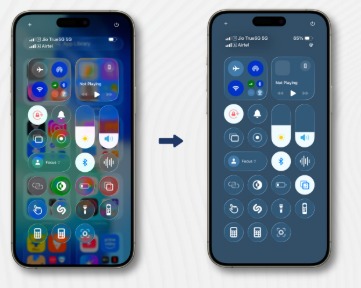
Apple has introduced a new toggle feature in its latest iOS update, allowing users to customize or disable the Liquid Glass display effect. The update comes after feedback from users who found the visual effect too intense or distracting on certain devices.
What Is the Liquid Glass Display?
Visual Effect: Provides a smooth, glass-like animation across UI elements.
Enhanced Experience: Designed to make scrolling, app transitions, and notifications feel more immersive.
User Feedback: Some users found it visually overwhelming or motion-intensive, especially on smaller screens.
The New Toggle Feature
Location: Available in Settings → Display & Brightness → Liquid Glass Effect Toggle.
Function:
On: Liquid Glass effect remains active for immersive UI animations.
Off: UI transitions revert to standard smooth animations, reducing motion intensity.
Customization: Apple may allow partial adjustments in future updates, based on user preference.
Benefits of the Toggle
Reduced Eye Strain: For users sensitive to motion or parallax effects.
Better Performance: Slightly improves battery life and responsiveness on older iPhone models.
Enhanced User Control: Offers personalization without compromising aesthetics.
FAQs:
Q1. What is Apple’s Liquid Glass display?
A1. A visual effect that creates smooth, glass-like animations for scrolling, notifications, and UI transitions.
Q2. How can I disable the Liquid Glass effect?
A2. Go to Settings → Display & Brightness → Liquid Glass Effect Toggle and switch it off.
Q3. Does turning off the effect impact performance?
A3. Yes, disabling it may slightly improve performance and battery life, especially on older devices.
Q4. Will this toggle be available on all iPhones?
A4. Apple has rolled it out for supported devices running the latest iOS version.
Q5. Why did Apple introduce this toggle?
A5. To address user feedback from those who found the Liquid Glass effect visually intense or distracting.
Published on : 21st October
Published by : SMITA
www.vizzve.com || www.vizzveservices.com
Follow us on social media: Facebook || Linkedin || Instagram
🛡 Powered by Vizzve Financial
RBI-Registered Loan Partner | 10 Lakh+ Customers | ₹600 Cr+ Disbursed
https://play.google.com/store/apps/details?id=com.vizzve_micro_seva&pcampaignid=web_share