

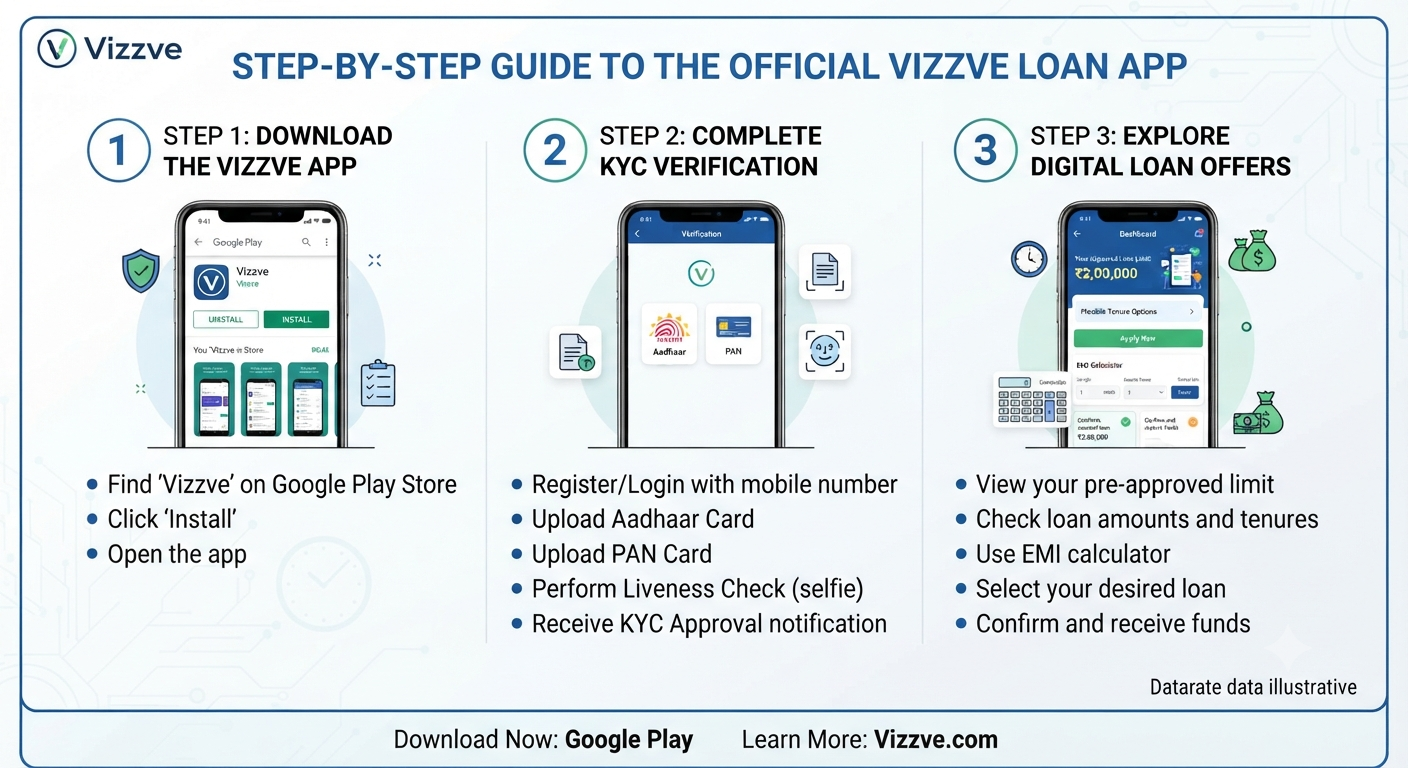
Digital lending platforms have made it easier for borrowers to explore loan options and complete application-related activities online. Instead of visiting multiple offices, users can access financial services through mobile applications and follow a simple digital process.
If you are planning to download the official Vizzve loan app, understanding the installation process, account setup, eligibility checks and loan application steps can help you get started confidently.
This step-by-step guide explains how to find the right Vizzve application, download it safely and understand what happens after installation.
1. Find the Official Vizzve App
The first step is to identify which Vizzve service you need.
-
Vizzve Financial: For exploring personal loan, business loan and other lending-partner offers.
-
Vizzve Microseva: For Microseva loan-related services and existing customer account management.
-
Vizzve Verification App: For supported digital KYC and verification activities.
Visit the official website to identify the correct application.
Official website: Vizzve.com.
2. Download and Install the Application
Follow these steps:
-
Open the Google Play Store or Apple App Store.
-
Search for the relevant official Vizzve application.
-
Check the developer or publisher name.
-
Review the app description and permissions.
-
Tap Install or Get.
-
Wait for installation to finish and open the application.
You can also access these verified listings:
Avoid downloading APK files from unknown websites.
3. Register Using Your Mobile Number
After installation, open the application and follow its registration instructions.
You may need to:
-
Enter your registered mobile number.
-
Verify your number using an OTP.
-
Provide basic personal information.
-
Accept the applicable terms and privacy policy.
Use your own mobile number and never share your OTP with another person.
4. Complete KYC Verification
Know Your Customer (KYC) verification helps establish the applicant's identity.
Depending on the application and lending partner, you may be asked to provide:
-
PAN card details.
-
Aadhaar-based verification, where supported and consented to.
-
Personal and residential information.
-
Bank account details.
-
Additional documents, if required.
Make sure all information is accurate before submitting your details.
5. Enter Your Loan Requirements
If you are using Vizzve Financial to explore loan offers, provide relevant information such as:
-
Required loan amount.
-
Monthly income.
-
Employment or business details.
-
Preferred repayment tenure.
-
Other requested financial information.
The platform uses the submitted information to help identify relevant lending options.
6. Check Available Loan Offers
After submitting the required details, eligible users may receive loan offers from participating financial institutions.
Compare the following details before selecting an offer:
|
Loan factor |
What to check |
|---|---|
|
Interest rate |
Applicable borrowing rate |
|
APR |
Overall annual borrowing cost |
|
Processing fee |
Applicable charges |
|
Loan tenure |
Repayment duration |
|
EMI |
Monthly repayment amount |
|
Total repayment |
Principal, interest and applicable charges |
Remember that Vizzve Financial acts as a loan aggregator and does not directly lend money. Final approval is provided by the lending partner.
7. Accept the Loan Terms and Complete Disbursal
If you receive an offer and decide to proceed:
-
Review the lender's loan agreement.
-
Read the Key Fact Statement (KFS), where applicable.
-
Check the interest rate, APR, EMI and fees.
-
Verify the repayment schedule.
-
Provide any additional verification required by the lender.
-
Accept the agreement only after understanding the terms.
After successful lender approval and completion of the required formalities, the loan amount may be transferred to your verified bank account.
8. Track Your Loan and Repay EMIs
After disbursal, borrowers should regularly monitor their repayment obligations.
Depending on the service and application, users may be able to:
-
Check outstanding loan balances.
-
View EMI schedules.
-
Review transaction history.
-
Receive repayment reminders.
-
Access loan-related account information.
Existing Microseva customers can use the Vizzve app to view supported loan and repayment details.
Eligibility Requirements for Vizzve Loan Services
Eligibility depends on the specific loan product and lending institution. Common assessment factors include:
-
Applicant's age and residency.
-
Valid identity and KYC documents.
-
Regular income or a suitable repayment source.
-
Bank account information.
-
Credit history, where applicable.
-
Existing financial obligations and repayment capacity.
Submitting an application does not guarantee loan approval.
Safety Tips Before Using the Vizzve Loan App
-
Download applications only through verified sources.
-
Check the developer's identity before installation.
-
Never share OTPs or banking passwords.
-
Read the privacy policy before submitting personal information.
-
Check the lender's name and regulatory status.
-
Review the KFS and all applicable loan charges.
-
Never pay an agent a personal-account commission for loan approval.
Vizzve's official website specifically warns users against upfront approval fees and payments to agents or third parties.
Frequently Asked Questions (FAQs)
1. How can I download the official Vizzve loan app?
Visit the official Vizzve website or use the verified Google Play Store and Apple App Store listings to find the appropriate application.
2. Is Vizzve Financial a direct lending company?
No. Vizzve Financial operates as a loan aggregator connecting borrowers with banks and NBFCs. The lending partner makes the final lending decision.
3. What documents are required for a Vizzve loan application?
Depending on the loan product, applicants may need PAN, Aadhaar-based KYC, bank details, income information and other supporting documents.
4. Can I apply for a loan through my smartphone?
Yes. Vizzve provides digital platforms that allow users to explore loan services and complete supported application steps through smartphones.
5. Does downloading the app guarantee loan approval?
No. Approval depends on eligibility checks, document verification and the lending institution's policies.
6. Can existing customers check EMI details through Vizzve?
Yes. Supported Microseva app features allow existing customers to access loan details, repayment schedules and transaction history.
7. Is it safe to download Vizzve APK files from third-party websites?
It is safer to use official app-store listings or verified links provided by Vizzve.
Conclusion
Downloading the official Vizzve loan app is the starting point for accessing its digital financial services. Users should identify the correct application, install it from a trusted source, complete the required registration and KYC steps, and review available loan terms carefully.
Whether you are exploring a personal loan through Vizzve Financial or managing an existing Microseva loan, understanding the application process can help you make informed borrowing decisions.
Always remember that loan approval depends on the relevant lender's assessment and responsible repayment planning.
Published on : 24th November 2026
Published by : Yogendra
www.vizzve.com || www.vizzveservices.com
Follow us on social media: Facebook || Linkedin || Instagram
🛡 Powered by Vizzve Financial
RBI-Registered Loan Partner | 10 Lakh+ Customers | ₹600 Cr+ Disbursed