

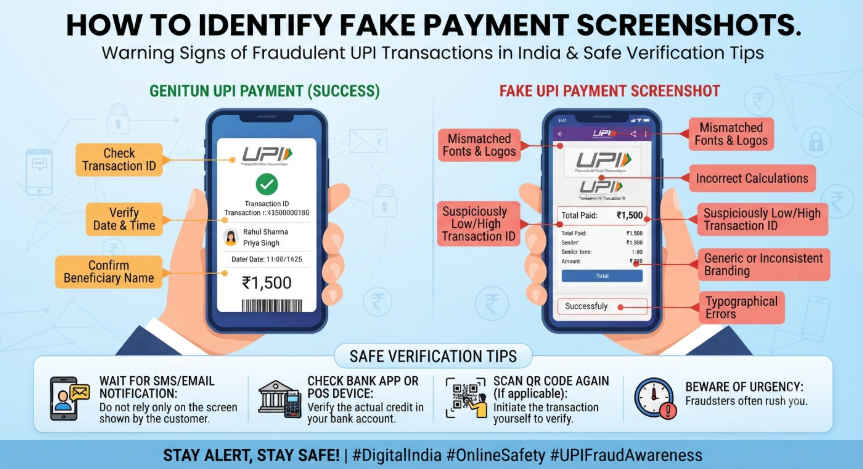
Introduction: Why Are Fake Payment Screenshots a Growing Concern?
Digital payments have made buying and selling easier. Customers can transfer money using UPI applications, mobile banking, QR codes, and other online payment methods.
However, payment-related scams can affect both individuals and businesses. One common method involves sending a screenshot that appears to show a successful transaction even though the payment has not actually reached the recipient.
For example, a customer may order a product from a shop and share an image showing a successful UPI transfer. The shopkeeper sees the screenshot, assumes the money has arrived, and hands over the product. Later, the shopkeeper checks the bank account and discovers that no payment was received.
This type of situation can cause financial losses, especially for small retailers, delivery businesses, online sellers, and service providers.
The important lesson is simple: a payment screenshot is only an image, not confirmation of a completed bank transaction.
3. AI Answer Box: How Can You Identify a Fake Payment Screenshot?
You can identify a potentially fake payment screenshot by checking whether the payment is reflected in your own bank account or official payment application.
Look for these warning signs:
-
The payment is not visible in your account.
-
The transaction ID or UTR details cannot be independently verified.
-
The displayed amount does not match the expected payment.
-
The sender pressures you to hand over goods before confirmation.
-
The screenshot contains inconsistent dates, times, names, or transaction details.
-
The sender refuses to wait for payment confirmation.
Best safety practice: Open your own bank or UPI application independently and check the transaction. Do not rely on screenshots, forwarded messages, or images shown on another person's phone.
Remember
4. What Is a Fake Payment Screenshot?
A fake payment screenshot is an image designed to make someone believe that a payment has been successfully completed when the actual payment has not been made or received.
Fraudsters may use image-editing software, modified templates, fabricated transaction screens, or screenshots from unrelated transactions.
These images may imitate popular payment applications and banking interfaces.
Common Situations Where Fake Payment Screenshots Are Used
-
Retail shops and supermarkets
-
Online product sales
-
Second-hand vehicle transactions
-
Rental deposits
-
Food delivery and local delivery services
-
Freelance work and service payments
-
Event bookings
-
Personal money transfers
-
Business collections and loan repayments
Small businesses can be particularly vulnerable when employees are busy and accept screenshots without checking their payment records.
5. 10 Warning Signs of a Fake Payment Screenshot
Here are common signs that should encourage you to verify a payment more carefully.
1. Payment Is Not Showing in Your Bank Account
This is the most important warning sign.
If someone shares a successful payment image but the amount does not appear in your bank account or official payment records, do not assume that the payment is complete.
Sometimes genuine transactions may take time to reflect because of technical issues. However, you should wait for independent confirmation rather than release goods based on a screenshot.
2. Incorrect Transaction Details
Check the information displayed in the image.
Look for possible inconsistencies in:
-
Transaction amount
-
Date and time
-
Sender name
-
Recipient name
-
Payment application details
-
Transaction reference number
A mismatch does not automatically prove fraud, but it is a reason to investigate.
3. Suspicious Transaction Reference
A UPI transaction usually has a transaction reference or UTR-related identifier.
A screenshot may display a number, but the presence of a number alone does not prove that a payment occurred.
Verify the transaction using your own bank or payment service records. Never rely on a reference number typed or shown only by the sender.
4. Blurry or Inconsistent Text
A suspicious image may contain:
-
Different font styles
-
Uneven text alignment
-
Unusual spacing
-
Blurry transaction details
-
Inconsistent logos or icons
-
Poorly aligned amounts
However, genuine screenshots can also look different across devices and app versions. Visual appearance alone is not reliable proof of fraud.
5. The Sender Creates Urgency
Be careful if someone says:
-
"Payment is completed. Give me the product quickly."
-
"Check later, the server is slow."
-
"I have already sent the money."
-
"The screenshot is proof."
-
"I am getting late, please hand over the order."
Pressure should never replace payment verification.
6. The Screenshot Shows an Unexpected Amount
Check whether the amount shown matches the invoice or order total.
For example, if the bill is ₹2,500 but the screenshot displays ₹2,000, do not treat the transaction as full payment.
7. The Recipient Details Are Different
Check whether the payment was actually sent to the correct recipient.
A genuine transaction to another person's UPI ID does not mean your business has received the money.
8. The Screenshot Is Reused
Some fraudsters may share an old payment screenshot from an unrelated transaction.
Check the transaction date, amount, recipient, and independent bank records before accepting it.
9. The Sender Refuses Independent Verification
If the sender becomes aggressive when you ask to verify the payment, remain cautious.
A genuine customer should generally understand that businesses need to confirm payments before releasing goods or services.
10. The Sender Asks You to Click an Unknown Link
A payment-related message may contain a link claiming to show transaction details or confirm a refund.
Do not enter your UPI PIN, banking password, OTP, or card details through an unknown link.
6. Fake Payment Screenshot vs Genuine Payment Confirmation
Understanding the difference between a screenshot and an actual payment confirmation can prevent unnecessary losses.
|
Verification point |
Screenshot shared by sender |
Independent payment confirmation |
|---|---|---|
|
Payment status |
Can display any status |
Available in your own transaction records |
|
Amount |
Can be edited in an image |
Can be checked against the credited amount |
|
Recipient |
May display incorrect details |
Can be checked against your account |
|
Transaction reference |
May be copied or fabricated |
Can be matched with bank records |
|
Proof of credit |
Not sufficient |
Bank credit entry provides stronger evidence |
|
Reliability |
Unverified image |
Independent account or payment records |
Important: A genuine-looking screenshot is not necessarily fraudulent, and a visually unusual screenshot is not necessarily fake. The actual transaction record is what matters.
7. How to Verify Whether a UPI Payment Is Real
Follow these steps before confirming a customer's payment.
Step 1: Open Your Own Payment Application
Open your bank's official mobile application or your registered UPI app directly.
Do not use a link or QR code sent by the customer to check whether money has arrived.
Step 2: Check Your Transaction History
Look for the incoming payment in your transaction history.
Confirm:
-
Payment amount
-
Transaction date
-
Transaction status
-
Sender details, where available
-
Transaction reference number
Step 3: Check Your Bank Account Statement
For important transactions, check the actual bank account statement or transaction history.
Look for a credit entry matching the amount and transaction reference.
Google Pay's official guidance also recommends checking transaction details against bank statements.
Step 4: Verify the Payment Status
A transaction may be marked as successful, processing, or failed.
Do not treat a pending transaction as confirmed payment. Wait for the bank or payment provider to update its status.
For example, Google Pay explains that processing transactions can take time to resolve and advises users to check their bank statements.
Step 5: Confirm the Correct Amount
If the customer owes ₹5,000, make sure the actual credit is ₹5,000.
Do not rely on a screenshot showing a different amount or a payment made to another recipient.
8. How Businesses Can Prevent Fake Payment Screenshot Scams
Businesses should establish a payment verification process that every employee follows.
A. Train Employees to Verify Every Payment
Tell staff members not to release products or close payment collections based only on screenshots.
B. Use a Business UPI Account
Where practical, use a dedicated business bank account and merchant payment facility. This makes it easier to identify customer payments.
C. Enable Payment Notifications
Use official bank alerts or merchant payment notifications. Notifications are useful, but reconcile important transactions with account records.
D. Maintain a Payment Register
Record every payment received.
|
Date |
Customer |
Invoice amount |
Amount received |
Status |
|---|---|---|---|---|
|
27 Nov |
Customer A |
₹2,500 |
₹2,500 |
Verified |
|
27 Nov |
Customer B |
₹1,800 |
₹0 |
Pending verification |
|
27 Nov |
Customer C |
₹3,000 |
₹3,000 |
Verified |
Illustrative example.
E. Do Not Allow Employees to Override Verification
Create a simple rule:
No confirmed credit, no payment completion.
This is particularly useful for busy shops, delivery counters, collection teams, and businesses that handle frequent UPI transactions.
9. Step-by-Step Guide: What to Do If You Receive a Fake Payment Screenshot
If you suspect a fake payment screenshot, follow a calm and consistent process.
-
Do not release the goods or service
Keep the order pending until the payment is independently verified.
-
Check your bank records
Review your account balance, transaction history, and statement.
-
Save the evidence
Preserve the screenshot, chat messages, order details, transaction reference, and relevant contact information.
-
Contact the payment provider or bank if necessary
Use the official customer support channel to investigate a disputed transaction.
-
Report suspected fraud
If money has been lost or a financial cybercrime has occurred, report it promptly through the appropriate official channels.
-
Update your internal payment records
Mark the transaction as disputed or unverified until the investigation is complete.
10. How to Report Payment Fraud in India
If you have been cheated through a fake payment screenshot or another digital payment scam, act quickly.
1930 – Cyber Financial Fraud Helpline
1930
Report financial cyber fraud as soon as possible.
Official reporting portal
National Cyber Crime Reporting PortalPreserve the complaint acknowledgement and follow the instructions provided by the authorities.
You can also contact your bank and payment service provider through their official channels.
The Ministry of Home Affairs' Indian Cyber Crime Coordination Centre operates the national cybercrime reporting portal and the 1930 helpline for financial cyber fraud reporting.
Documents and Information to Keep Ready
-
Your bank account transaction details
-
UPI transaction ID or UTR, if available
-
Date and time of the incident
-
Amount involved
-
Screenshot or message received
-
Sender's phone number or UPI ID, if available
-
Bank or payment provider complaint reference
-
Relevant chat or order details
Do not share your UPI PIN, OTP, passwords, or full banking credentials with anyone claiming to help you recover money.
11. Important UPI Safety Rules Everyone Should Know
Fake payment screenshot scams are one type of digital payment fraud. Other scams may involve fake collect requests, phishing links, remote-access applications, and impersonation.
The Reserve Bank of India advises customers not to share confidential details such as passwords, PINs, OTPs, CVVs, or UPI PINs.
Remember these rules:
-
You do not need to enter your UPI PIN to receive money.
-
Never share your OTP with another person.
-
Do not install unknown applications to receive payments.
-
Avoid clicking suspicious payment or refund links.
-
Check the recipient before approving a payment.
-
Do not scan an unknown QR code just because someone says it will help you receive money.
-
Use official bank and payment application channels.
-
Keep your payment applications updated.
Why Is a UPI PIN Important?
A UPI PIN is used to authorise certain transactions from your bank account. Entering it without understanding the request can result in money being debited.
The RBI has specifically warned users about fraudulent collect requests that ask people to enter their UPI PIN under the false claim that they are receiving money.
12. Pros and Cons of Digital Payment Verification
|
Advantages |
Possible limitations |
|---|---|
|
Reduces the risk of accepting fake payment proof |
Bank updates may sometimes be delayed |
|
Helps maintain accurate accounts |
Requires staff training |
|
Makes payment reconciliation easier |
Manual checking takes time |
|
Protects business inventory and revenue |
Technical issues can interrupt access |
|
Creates a reliable transaction history |
Different apps may display details differently |
Independent verification is worth the extra time, especially for high-value transactions.
13. Real-World Example: How a Fake Screenshot Can Affect a Small Shop
Imagine a customer purchases a mobile accessory worth ₹4,500 from a local electronics shop.
The customer shows the shopkeeper a screenshot displaying:
-
Recipient name
-
₹4,500 payment amount
-
Successful payment message
-
Transaction reference number
The shopkeeper trusts the image and gives the customer the product.
Later, the shopkeeper checks the bank account and finds no corresponding credit.
The business has lost the product's value because the payment was never independently verified.
What could have prevented the loss?
The shopkeeper could have checked the incoming transaction in the official payment application or bank account before handing over the product.
This simple verification step can reduce avoidable payment losses.
14. Expert Commentary: Why Payment Verification Should Be a Business Rule
A payment screenshot should be treated as information provided by the sender, not as proof of funds received.
For businesses handling frequent payments, verification should be part of the standard checkout and collection process. Employees should have a clear procedure for pending transactions, failed payments, duplicate transfers, and disputed credits.
For higher-value payments, businesses should also maintain a proper reconciliation trail containing the invoice number, payment reference, date, amount, and bank credit confirmation.
This approach improves financial control and provides useful records if a transaction is disputed.
15. Frequently Asked Questions (FAQs)
1. How can I identify a fake payment screenshot?
Check whether the payment is actually credited to your bank account. Look for mismatched amounts, recipient details, dates, and transaction references, but remember that visual checks alone cannot confirm fraud.
2. Is a payment screenshot proof of payment?
No. A screenshot is only an image. Confirm the transaction through your own bank account or official payment application.
3. How do I check whether a UPI payment is successful?
Open your official bank or UPI application, check transaction history, and confirm the incoming credit and transaction details.
4. Can Google Pay payment screenshots be edited?
Yes. Images can be manipulated using editing software. Never accept a screenshot as independent proof of payment.
5. How do I identify a fake PhonePe payment screenshot?
Do not depend only on the appearance of the screenshot. Open your own payment application or bank account and check whether the expected amount has been credited.
6. How do I verify a Paytm payment?
Check the relevant transaction in your official payment or bank records. Confirm the amount, recipient, and transaction status independently.
7. What is a UPI transaction ID?
A UPI transaction ID is a reference associated with a UPI payment. It helps identify and investigate a transaction, but a number displayed in a screenshot alone does not prove that money was received.
8. Can a successful payment screenshot still be fake?
Yes. Someone can create an image that displays a successful status without completing the actual payment.
9. What should a shopkeeper do if a customer shows a payment screenshot?
The shopkeeper should check the bank account or official merchant payment records before releasing the goods. If the credit is not confirmed, keep the transaction pending.
10. What should I do if I receive a fake payment screenshot?
Do not release goods or services. Save the evidence, verify your bank records, and report suspected fraud through your bank and the appropriate cybercrime reporting channels.
11. Can I recover money lost through a fake payment screenshot scam?
Recovery depends on the circumstances and investigation. Contact your bank immediately and report financial cyber fraud through 1930 or the official cybercrime portal.
12. Is it safe to share my UPI PIN to receive money?
No. Never share your UPI PIN. You do not need to enter it simply to receive money into your bank account.
13. Can a fake transaction ID look genuine?
Yes. A reference number can be copied, invented, or taken from another transaction. Verify it against your own bank or payment provider records.
14. How can small businesses prevent fake payment scams?
Use a dedicated business account, enable official payment alerts, maintain a payment register, train employees, and verify every payment before releasing goods or services.
15. Where can I report online payment fraud in India?
You can call the national cyber financial fraud helpline at 1930 or submit a complaint through cybercrime.gov.in. Contact your bank immediately as well.
Published on : 27th November
Published by : G REDDY KUMAR
www.vizzve.com || www.vizzveservices.com
Follow us on social media: Facebook || Linkedin || Instagram
🛡 Powered by Vizzve Financial
RBI-Registered Loan Partner | 10 Lakh+ Customers | ₹600 Cr+ Disbursed