

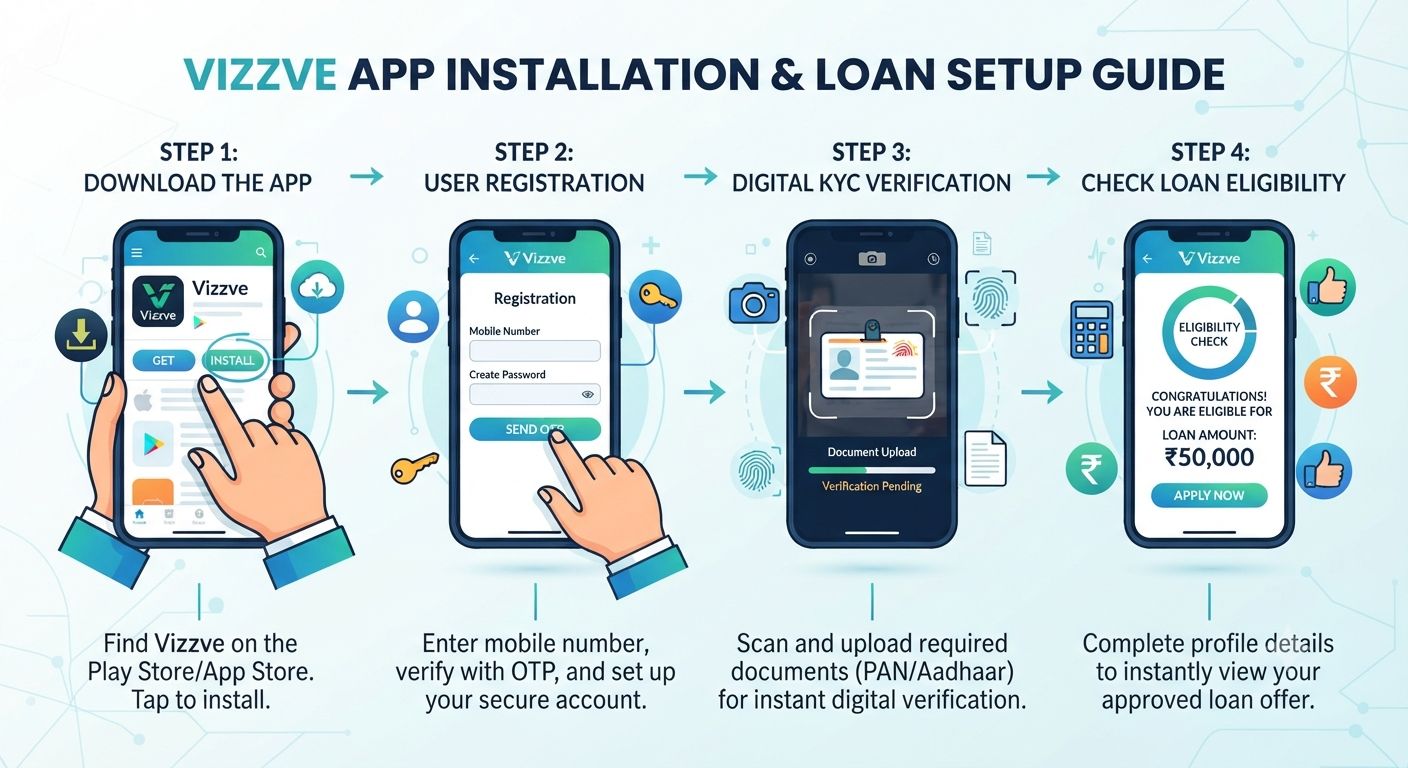
Vizzve app installation involves downloading the relevant official application, setting it up on a compatible smartphone and completing the required registration process.
Depending on the service selected, users may access features such as:
-
Digital registration and profile creation.
-
Online identity verification.
-
Loan application facilities.
-
Financial product information.
-
Loan-related account services.
-
Repayment and payment information.
Vizzve Financial Services acts as a loan aggregator platform connecting borrowers with partner banks and NBFCs. The actual lending institution makes the final loan approval and disbursal decision.
2. Step-by-Step Guide to Vizzve App Installation
Step 1: Visit the Official Vizzve Website
Start by visiting the official website at www.vizzve.com.
Check the available application options and identify the correct app for your financial requirements.
Step 2: Download the Official Application
Open the verified Google Play Store or Apple App Store listing through the official website.
Check the application name and developer details before downloading. Avoid unofficial APK files and unknown links.
Step 3: Install and Open the App
Tap the Install option and wait for the application to download.
Once installation is complete, open the application and follow the instructions displayed on your screen.
Step 4: Register Your Mobile Number
Enter your registered mobile number and complete OTP verification if requested.
This step helps verify your contact information and establish your application profile.
Step 5: Enter Your Personal Information
Provide the information requested during registration, which may include:
-
Full name
-
Date of birth
-
Residential address
-
Employment details
-
Monthly income
-
PAN information
Ensure that all submitted information is accurate.
Step 6: Complete Digital KYC Verification
Complete the identity verification process using the accepted documents.
Commonly requested documents include:
-
PAN card
-
Aadhaar card or accepted identity proof
-
Bank account details
-
Income proof, where required
Submit documents only through verified application channels.
Step 7: Check Available Loan Offers
After completing the required information, eligible users may be able to explore loan offers from partner financial institutions.
Compare the available offers based on interest rates, APR, processing fees, repayment periods and EMI amounts.
Step 8: Review and Submit Your Application
Before accepting an offer, carefully read the loan agreement and Key Fact Statement (KFS).
Check the total repayment amount, applicable charges, repayment schedule and lender details.
Submit the application only when you understand and agree to the terms.
Step 9: Complete the Final Verification Process
The lending partner may conduct additional checks, including income verification, credit assessment and bank account validation.
Loan approval depends on the lender's assessment and eligibility requirements.
Step 10: Receive Loan Disbursal After Approval
If the lending partner approves the application, the loan amount is disbursed according to the agreed terms.
Check the credited amount and save the loan agreement and repayment schedule for future reference.
3. Documents Required During Vizzve App Installation and Registration
The documents required may differ depending on the service and lending partner.
| Document | Purpose |
|---|---|
| PAN Card | Financial identity verification |
| Aadhaar Card | Identity and KYC verification |
| Mobile Number | Registration and OTP |
| Bank Details | Account verification and disbursal |
| Bank Statement | Income assessment, if required |
| Salary Slip | Employment and income verification |
Not every applicant will necessarily need to submit all these documents during initial installation.
4. Important Checks During the Installation Process
Users should follow a few precautions while installing and using digital financial applications.
Verify the Application: Download only from official app-store listings or verified website links.
Check App Permissions: Review requested permissions and avoid granting unnecessary access to personal information.
Protect OTPs: Never share OTPs, passwords or banking PINs with anyone.
Review Privacy Information: Understand how personal and financial information may be collected, processed and shared.
Verify Lending Partners: Check the actual bank or NBFC providing the loan.
Understand Loan Charges: Review interest rates, APR, processing fees and repayment conditions before accepting an offer.
5. Common Problems During Vizzve App Installation
Users may occasionally experience technical or registration difficulties.
-
Download Issues: Check internet connectivity and available phone storage.
-
OTP Delays: Verify the mobile number and network connection.
-
KYC Failure: Check document details and submit clear, valid information.
-
Application Errors: Update the application and try again.
-
Login Problems: Follow the official account recovery instructions or contact customer support.
For assistance, users can contact Vizzve through the support details published on its official website.
6. Key Facts About Vizzve App Installation
-
Installation and registration do not guarantee loan approval.
-
KYC requirements depend on the financial service.
-
Loan offers depend on eligibility and lending partner policies.
-
Interest rates and processing charges may vary.
-
Final approval and disbursal are handled by the applicable lending institution.
-
Users should always download applications from verified sources.
-
Borrowers should review the KFS and loan agreement before accepting credit.
7. Final Thoughts
The Vizzve app installation process starts with downloading the correct application and completing the necessary registration steps. Users may then proceed with digital KYC, explore available financial options and submit a loan application where applicable.
However, downloading an application is different from receiving loan approval. Borrowers should verify the application, protect their personal information and carefully evaluate loan costs before accepting any financial offer.
Following these steps can help users navigate digital lending services more confidently and responsibly.
Frequently Asked Questions (FAQs)
1. How does Vizzve app installation work?
Users download the official application, install it, register their mobile number and complete the required verification steps.
2. Where can I download the Vizzve app?
Visit www.vizzve.com and follow the verified application links to the relevant app store.
3. Is mobile number verification required?
Mobile number and OTP verification may be required during registration.
4. Is KYC necessary after installation?
KYC is generally required when accessing services that involve identity verification or loan applications.
5. Can I apply for a loan immediately after installation?
You may be able to start an application after registration, subject to the requirements of the relevant service.
6. Does Vizzve guarantee instant loan approval?
No. Final approval depends on the lending partner's verification, credit assessment and eligibility policies.
7. Is Vizzve Financial a direct lender?
Vizzve Financial describes itself as a loan aggregator connecting applicants with partner banks and NBFCs. The lending partner makes the final lending decision.
8. What should I do if Vizzve app installation fails?
Check your internet connection, device storage and application compatibility. If the problem continues, contact official customer support.
Published on : 25th November 2026
Published by : Yogendra
www.vizzve.com || www.vizzveservices.com
Follow us on social media: Facebook || Linkedin || Instagram
🛡 Powered by Vizzve Financial
RBI-Registered Loan Partner | 10 Lakh+ Customers | ₹600 Cr+ Disbursed