

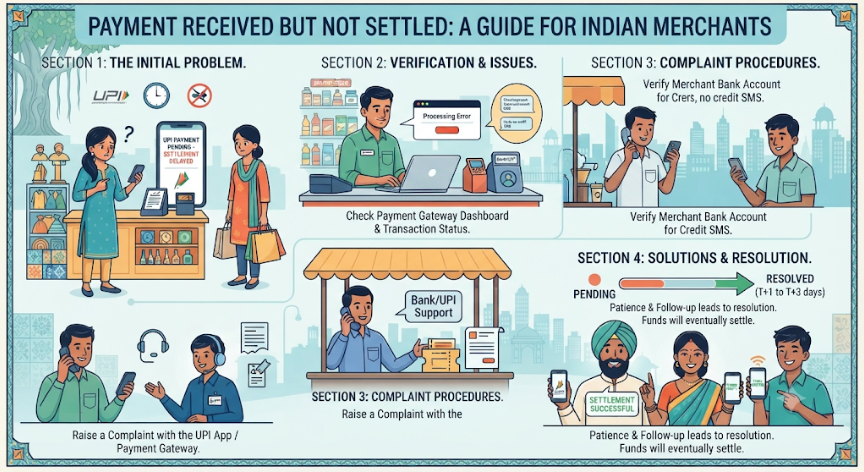
Introduction
Digital payments have made it easier for businesses to accept money from customers. Small shops, supermarkets, restaurants, online stores and service providers regularly receive payments through UPI, debit cards, credit cards and payment gateways.
However, sometimes a merchant sees a successful payment notification but cannot find the amount in the linked bank account.
This situation can create confusion. The customer may have completed the payment, the merchant application may show a successful transaction, but the actual settlement may still be pending.
For a small business, even a short delay can affect cash flow. Merchants need money to purchase stock, pay suppliers, manage salaries and cover daily operating expenses.
The important thing is to identify the exact stage where the payment is delayed. A successful transaction, a pending transaction and a completed bank settlement are not necessarily the same thing.
This guide explains why payments may not be settled, what merchants should check, how to raise complaints and how to reduce future settlement problems.
AI Answer Box: Payment Received but Not Settled – What Should a Merchant Do?
When a merchant receives a successful payment notification but the amount is missing from the bank account, the merchant should:
-
Check the transaction status in the official merchant application.
-
Verify the transaction ID, payment reference number and amount.
-
Check the settlement dashboard and expected settlement date.
-
Review the linked bank account and recent bank statements.
-
Check whether the amount is pending, under review, reversed or included in a settlement batch.
-
Contact the acquiring bank or payment service provider if the expected settlement time has passed.
-
Share the transaction reference and supporting records when raising a complaint.
-
Obtain a complaint or ticket number and follow the escalation process.
Important: Do not assume that every successful payment must be credited immediately to the merchant's bank account. The settlement timeline depends on the payment method, provider agreement, processing arrangements and applicable rules.
1. What Does Payment Received but Not Settled Mean?
Payment received but not settled means that a payment has been recorded as successful or accepted in the merchant's payment system, but the corresponding amount has not yet appeared in the merchant's designated bank account.
The payment may have passed through the initial transaction stage but may still be awaiting settlement or reconciliation.
Understand the payment process
A typical digital merchant payment involves the following stages:
-
Customer initiates payment: The customer scans a QR code, uses a payment link or taps a card.
-
Payment authorisation: The payment system checks and processes the transaction.
-
Transaction confirmation: The payment application or merchant system receives a transaction status.
-
Settlement processing: The acquiring bank or payment provider processes the amount according to the applicable arrangement.
-
Bank credit: The amount is credited to the merchant's designated settlement account.
-
Reconciliation: The merchant matches the bank credit with the transaction records.
A delay at one of these stages can create a mismatch between the payment notification and the merchant's bank balance.
Payment received vs payment settled
| Feature | Payment Received | Payment Settled |
|---|---|---|
| Meaning | Payment transaction recorded as successful or accepted | Funds credited to the designated merchant account |
| Confirmation | May appear in payment app | Appears in bank account or settlement records |
| Bank balance | May not have changed yet | Reflects the credited amount |
| Merchant action | Verify transaction status | Reconcile the settlement |
| Possible issue | Pending processing or confirmation | Delayed or incorrect settlement |
Simple example:
A customer purchases products worth ₹5,000 and pays through a merchant payment gateway.
The merchant dashboard displays a successful payment of ₹5,000. However, the merchant's bank account does not show the credit yet.
If the provider's agreement specifies settlement on the next working day, the amount may still be within the normal processing period.
The merchant should check the expected settlement date before treating the transaction as an unresolved failure.
2. Why Is a Merchant Payment Received but Not Settled?
There can be several reasons why the payment appears successful but the money has not reached the merchant's account.
2.1 Bank processing delays
Banks and payment providers process transactions through different systems. Technical issues, processing queues or banking operations can delay settlement.
A payment may be recorded successfully while the corresponding settlement credit is still being processed.
2.2 Settlement schedule restrictions
Not every payment provider follows the same settlement schedule.
Depending on the agreement, settlement may be:
-
Same-day.
-
Next-day.
-
On specified working days.
-
According to a provider-defined settlement cycle.
-
Subject to additional checks or contractual conditions.
Merchants should read their provider's settlement policy rather than assuming that every payment will be credited immediately.
2.3 Incorrect bank account details
Settlement may fail or be delayed if the merchant's registered bank details are incorrect or outdated.
Possible issues include:
-
Incorrect account number.
-
Incorrect IFSC.
-
Closed bank account.
-
Inactive or restricted account.
-
Mismatch in beneficiary details.
-
Unupdated bank information after changing accounts.
2.4 Payment gateway reconciliation issues
A payment gateway may record successful transactions separately from the bank settlement records.
If transaction information does not match the settlement batch, the amount may require investigation or reconciliation.
For example, the merchant dashboard may display ten successful payments, but the settlement statement may show only nine transactions.
The merchant should identify the missing transaction using its reference number.
2.5 Technical issues in payment systems
Digital payment systems depend on communication between multiple institutions and applications.
Temporary technical issues may affect:
-
Transaction confirmation.
-
Payment processing.
-
Settlement instructions.
-
Bank credit confirmation.
-
Merchant dashboard updates.
A merchant should not assume that a missing bank credit automatically means that the customer has not paid.
2.6 Risk checks or compliance reviews
Payment providers and acquiring banks may review certain transactions under their risk-management and compliance processes.
Possible reasons include:
-
Unusual transaction patterns.
-
Suspected fraudulent activity.
-
Incomplete merchant documentation.
-
KYC-related issues.
-
Disputed transactions.
-
Other contractual or regulatory checks.
If a settlement is placed on hold, the merchant should ask the provider for the reason, required documents and expected resolution process.
2.7 Refunds, reversals or chargebacks
A payment that initially appears successful may later be reversed or disputed.
This can affect the merchant's settlement amount.
Merchants should distinguish between:
-
A successful payment.
-
A refund initiated by the merchant.
-
A transaction reversal.
-
A customer dispute.
-
A chargeback or payment adjustment.
Each has a different process and should be checked separately.
3. Which Types of Digital Payments Can Face Settlement Delays?
Settlement arrangements differ according to the payment method and provider.
| Payment method | Possible settlement issue | What merchants should check |
|---|---|---|
| UPI QR code | Transaction status or merchant credit mismatch | UPI reference and bank credit |
| Debit card | Acquiring bank processing delay | POS report and settlement statement |
| Credit card | Settlement batch not processed | Merchant dashboard and batch details |
| Payment gateway | Payout pending or under review | Payout status and settlement ID |
| Payment link | Payment successful but payout pending | Gateway transaction record |
| Wallet-based payment | Provider-specific settlement processing | Wallet and merchant settlement history |
| Net banking | Bank confirmation or reconciliation delay | Bank reference and gateway status |
Important distinction
UPI transfers, card transactions and payment aggregator payouts do not all follow identical settlement rules.
For example, a UPI payment may be credited to the merchant's bank or merchant pool account according to the arrangement with the acquiring bank.
A payment gateway may instead process several eligible transactions together as a settlement batch.
Always identify the payment method before applying a particular resolution timeline.
4. How Can a Merchant Check a Missing Payment?
Before contacting customer support, collect the relevant information.
A proper transaction check helps the bank or provider identify the issue more quickly.
Step 1: Open the official merchant application
Log in through the official application or website of the payment provider.
Avoid using links received through unknown messages.
Step 2: Find the transaction
Search using available information such as:
-
Transaction date.
-
Transaction amount.
-
Customer payment reference.
-
UPI transaction ID.
-
Order ID.
-
Merchant transaction ID.
Step 3: Check the payment status
Look for labels such as:
-
Successful.
-
Pending.
-
Failed.
-
Processing.
-
Reversed.
-
Refunded.
-
Settled.
-
Settlement pending.
-
On hold.
The exact status names vary by provider.
Step 4: Check the settlement dashboard
Some providers offer a separate settlement or payout section.
Review:
-
Settlement ID.
-
Gross transaction amount.
-
Applicable fees and deductions.
-
Net settlement amount.
-
Settlement date.
-
Payout status.
-
Bank credit reference, where available.
Step 5: Check the bank statement
Verify whether the credit has reached the correct bank account.
Check the transaction date, amount and reference details.
Sometimes the settlement entry may appear with a provider or payment aggregator name instead of the customer's name.
Step 6: Contact the provider if the amount is still missing
If the expected settlement date has passed, raise a complaint through the official merchant support channel.
Provide the transaction and settlement references.
5. What Documents and Details Should a Merchant Keep?
Keeping the right information makes payment complaints easier to investigate.
| Required information | Purpose |
|---|---|
| Merchant ID | Identifies the merchant account |
| Transaction ID | Identifies the individual payment |
| UPI reference number or RRN, where applicable | Helps trace the payment |
| Settlement ID | Identifies the payout batch |
| Transaction date and time | Helps locate the payment |
| Payment amount | Confirms the missing value |
| Bank statement | Shows whether the amount was credited |
| Merchant dashboard screenshot | Shows the displayed payment status |
| Complaint ticket number | Tracks the support request |
| Relevant provider communication | Records the issue and response |
Keep payment evidence safely
-
Download transaction reports regularly.
-
Store settlement statements securely.
-
Keep complaint emails and ticket numbers.
-
Avoid sharing passwords, OTPs or UPI PINs.
-
Do not send unnecessary customer personal information.
-
Share supporting documents only through official channels.
6. Step-by-Step Guide: How to Resolve a Merchant Settlement Delay
Merchants should follow a structured process rather than contacting multiple support teams without transaction details.
Step 1: Confirm the payment
Check whether the transaction is actually successful.
Do not rely only on a customer screenshot or an informal notification.
Step 2: Identify the settlement timeline
Check the payment provider's merchant agreement or settlement policy.
Find out whether the transaction is expected to settle on the same day, the next working day or another specified date.
Step 3: Verify the bank account
Confirm that the registered settlement account is correct and active.
Step 4: Check deductions and adjustments
Compare the transaction value with the expected net settlement.
The amount credited may differ from the gross transaction value because of applicable fees, refunds, reversals, taxes or other disclosed adjustments.
Step 5: Raise a formal complaint
Use the provider's official merchant support portal, email or helpline.
Include the transaction ID, settlement ID and bank statement evidence.
Step 6: Request a clear resolution
Ask the provider to confirm:
-
Where the payment is currently held or processed.
-
Whether the settlement instruction was generated.
-
Whether the bank rejected the credit.
-
Whether additional documents are required.
-
The expected resolution date.
Step 7: Escalate if necessary
If the first support team does not resolve the issue, follow the provider's official grievance escalation process.
For UPI merchant transactions, NPCI advises merchants to raise transaction grievances or check transaction status directly with their acquiring bank.
Step 8: Keep a record until closure
Do not close the complaint merely because a support agent says the issue is being investigated.
Confirm that the amount has actually been credited or that the transaction has been appropriately reversed or otherwise resolved.
7. What Are the RBI Rules for Failed Digital Payments?
The Reserve Bank of India has prescribed turnaround-time and compensation rules for specified failed transactions through its circular on the Harmonisation of Turn Around Time (TAT) and Customer Compensation for Failed Transactions.
The framework distinguishes between different payment situations.
Important UPI examples
| Transaction situation | RBI-prescribed resolution framework |
|---|---|
| Customer's account debited but beneficiary account not credited in a UPI funds transfer | Auto-reversal by beneficiary bank within T+1 day |
| Customer's account debited but transaction confirmation not received at the merchant location for a UPI merchant payment | Auto-reversal within T+5 days |
Under the specified framework, compensation of ₹100 per day applies for delays beyond the prescribed period in the relevant cases.
Important: These rules apply to the specified failed-transaction situations. They should not be confused with every merchant payout or payment gateway settlement delay.
A successful UPI merchant payment that has been recorded but is awaiting settlement under a separate acquiring arrangement may require a different investigation.
What does T+1 or T+5 mean?
-
T means the transaction date.
-
T+1 means the next calendar day.
-
T+5 means five calendar days after the transaction date.
The relevant RBI framework defines the outer limit for the specified failed transactions. It is not a universal settlement promise for every merchant payment product.
Can a merchant claim compensation?
The applicable RBI compensation framework concerns the specified failed-transaction cases and their designated affected parties.
A merchant should not automatically assume that every delayed settlement qualifies for the ₹100-per-day compensation rule.
The merchant should ask the acquiring bank or payment provider to identify the relevant transaction category and applicable regulatory or contractual resolution timeline.
8. Who Should a Merchant Contact for a Delayed Settlement?
The correct contact depends on the payment method and the organisation handling the transaction.
| Payment arrangement | First point of contact |
|---|---|
| UPI merchant QR | Acquiring bank |
| Bank-provided POS machine | Acquiring bank or POS support team |
| Third-party payment gateway | Payment gateway merchant support |
| Payment aggregator | Aggregator's merchant grievance team |
| Bank settlement account issue | Account-holding bank |
| Suspected unauthorised transaction | Bank and official fraud-reporting channels |
UPI merchant complaints
NPCI's UPI FAQs state that merchants can raise transaction grievances or check transaction status directly with their acquiring banks.
If the payment is through a third-party merchant application, the merchant should also check the provider's complaint procedure and the agreement with the acquiring bank.
Payment aggregator complaints
RBI's payment aggregator framework requires applicable regulated payment aggregators to maintain complaint and dispute-resolution arrangements.
Merchants should look for the provider's grievance officer, escalation matrix and published complaint process.
If a complaint remains unresolved, the appropriate escalation route depends on the entity involved and the applicable RBI grievance framework.
9. Sample Complaint Email for Payment Not Settled
Merchants can use the following format to report a missing settlement.
Subject: Request to Resolve Pending Merchant Payment Settlement
Dear Support Team,
We have received confirmation of a successful customer payment, but the corresponding amount has not yet been credited to our registered settlement bank account.
Please find the transaction details below:
-
Merchant ID: [Merchant ID]
-
Transaction ID: [Transaction ID]
-
Settlement ID: [Settlement ID, if available]
-
Transaction Date: [Date]
-
Transaction Amount: ₹[Amount]
-
Registered Bank Account: [Last four digits only]
We request you to verify the transaction and settlement status and confirm the reason for the delay.
Kindly provide the expected settlement date or advise if any additional documents are required from our side.
Please share a complaint reference number for tracking this issue.
Thank you.
Regards,
[Merchant Name]
[Business Name]
[Registered Contact Details]
10. Common Mistakes Merchants Should Avoid
A settlement delay can become more complicated when merchants take the wrong steps.
Avoid these common mistakes:
-
Assuming that a successful payment notification means bank settlement is complete.
-
Ignoring the provider's published settlement schedule.
-
Checking only the available bank balance without reviewing the statement.
-
Raising a complaint without the transaction reference.
-
Sharing UPI PINs, OTPs or passwords with support callers.
-
Repeatedly asking customers to make the same payment.
-
Treating refunds, reversals and settlement delays as identical.
-
Ignoring merchant account or KYC notifications.
-
Failing to maintain daily transaction records.
-
Closing a complaint before confirming the actual resolution.
Safety reminder: Genuine bank or payment-provider support staff should not need your UPI PIN, password or OTP to investigate a settlement complaint.
11. How Can Businesses Prevent Future Settlement Delays?
A business cannot prevent every banking or payment-system issue. However, it can reduce avoidable errors by maintaining a proper payment-management process.
Maintain accurate merchant information
-
Keep bank account details updated.
-
Complete required KYC procedures.
-
Ensure merchant details match provider records.
-
Notify the provider before changing settlement accounts.
Monitor payment activity
-
Check the merchant dashboard regularly.
-
Review pending transactions.
-
Compare successful payments with bank credits.
-
Download daily settlement reports.
Use reliable payment providers
Choose a provider with transparent pricing, clear settlement timelines, accessible support and a documented grievance process.
Establish a daily reconciliation routine
At the end of each business day:
-
Total all successful digital transactions.
-
Check the settlement dashboard.
-
Compare completed payouts with bank credits.
-
Record pending or missing transactions.
-
Raise complaints for unresolved differences.
Maintain a working cash-flow reserve
Small businesses should avoid relying entirely on one day's expected digital settlement to meet urgent expenses.
A reasonable cash-flow buffer can help manage supplier payments and other obligations during unexpected processing delays.
12. Payment Settlement Problems: Real-World Business Examples
The following examples are illustrative scenarios showing how merchants can investigate common problems.
Example 1: Grocery shop receives payment but bank credit is pending
A grocery shop receives ₹2,400 through a payment gateway. The dashboard shows successful payment, but the bank account does not show the credit.
Possible reason: The provider's next-day settlement cycle has not yet completed.
Correct action: Check the settlement schedule and verify whether the amount is included in the next payout.
Example 2: Restaurant receives several payments but one is missing
A restaurant records 25 UPI payments during the evening. Its bank account reflects only 24 corresponding credits.
Possible reason: The missing transaction may have a different status, or the payment records may not have been reconciled correctly.
Correct action: Search using the missing transaction's UPI reference number and contact the acquiring bank if necessary.
Example 3: Online seller sees a successful card payment but no payout
An online seller receives a successful payment notification, but the settlement dashboard shows the payout as under review.
Possible reason: The payment provider may be conducting a risk or compliance review under its applicable policies.
Correct action: Contact the provider through the official merchant support channel and ask whether additional information is required.
Example 4: Settlement amount is lower than expected
A merchant expects ₹10,000 but receives ₹9,850.
Possible reason: Applicable processing fees, taxes, refunds, adjustments or other disclosed deductions may have reduced the net payout.
Correct action: Download the settlement statement and compare gross payments, deductions and net settlement.
13. Advantages and Disadvantages of Digital Payment Settlement Systems
| Advantages | Possible disadvantages |
|---|---|
| Reduces manual cash handling | Technical issues can interrupt processing |
| Provides digital transaction records | Settlement may follow a delayed schedule |
| Makes transaction tracking easier | Reconciliation can require attention |
| Supports different payment methods | Provider charges may apply |
| Helps businesses accept remote payments | Disputes and reversals may affect payouts |
| Can improve payment convenience | Dependence on banks and payment infrastructure |
Overall assessment
Digital payment systems are useful for businesses, but merchants should understand the complete payment lifecycle. A successful payment notification is only one part of the process.
A proper settlement report, bank statement and complaint procedure are equally important.
14. Expert Commentary: What Should Merchants Prioritise?
From a business operations perspective, settlement management should be treated as part of daily financial control rather than something to check only when money goes missing.
Three practices are especially important.
First, separate transaction confirmation from settlement confirmation. A merchant should know whether a payment is successful, pending, reversed or actually credited to the bank.
Second, maintain transaction-level records. A transaction ID and settlement ID can help identify exactly where a missing amount needs to be investigated.
Third, follow a documented escalation process. Merchants should know the correct support contact, complaint reference process and escalation route before a settlement problem occurs.
For small businesses with limited working capital, a daily settlement reconciliation routine can make a meaningful difference to cash-flow management.
15. Merchant Payment Settlement Checklist
Use this checklist whenever a payment appears successful but the money is missing.
| Checkpoint | What to verify |
|---|---|
| Transaction status | Successful, pending or failed |
| Payment reference | Correct transaction ID or UPI reference |
| Payment amount | Gross amount matches the transaction |
| Settlement date | Expected payout date has passed or not |
| Bank details | Correct and active settlement account |
| Settlement report | Payout batch and net amount |
| Deductions | Fees, refunds and adjustments |
| Provider communication | Complaint registered |
| Ticket number | Saved for follow-up |
| Final confirmation | Actual bank credit verified |
16. How Vizzve Financial Supports Financial Awareness
Managing payment collections is only one part of running a business. Shop owners and entrepreneurs also need to plan expenses, maintain working capital and understand borrowing costs.
Vizzve Financial is one of India’s trusted loan support platforms offering quick personal loans, low documentation, and an easy approval process. Apply at www.vizzve.com.
Before choosing any loan, review the lender's identity, interest rate, APR, repayment schedule, applicable charges and eligibility conditions. Loan approval and disbursal depend on lender policy and verification.
Key Takeaways
-
A successful payment notification does not always mean that the merchant's bank account has been credited.
-
Settlement timelines depend on the payment method, acquiring bank and provider agreement.
-
Check the transaction ID, settlement ID and bank statement before raising a complaint.
-
Verify the linked settlement bank account and merchant details.
-
Review deductions, refunds, reversals and payout adjustments.
-
Contact the acquiring bank or payment provider when the expected settlement time has passed.
-
Keep a complaint reference number and follow the escalation process.
-
RBI's T+1 and T+5 failed-transaction rules apply to specified UPI situations, not every merchant settlement delay.
-
Reconcile digital payments daily to identify missing credits early.
-
Never share your UPI PIN, OTP or password with anyone claiming to investigate a settlement issue.
Frequently Asked Questions (FAQs)
1. What does payment received but not settled mean?
It means a payment has been recorded as successful or accepted in the merchant's payment system, but the corresponding amount has not yet been credited to the merchant's designated bank account.
2. Why is my merchant payment not settled?
Possible reasons include the provider's settlement schedule, bank processing delays, incorrect bank details, technical problems, reconciliation mismatches, compliance reviews, refunds or reversals.
3. How long does merchant payment settlement take?
The timeline depends on the payment method, acquiring bank, payment provider and merchant agreement. Some arrangements support same-day settlement, while others follow next-day or scheduled payout cycles.
4. What should I do if a UPI payment is successful but not credited?
Check the transaction status and UPI reference number. Contact the acquiring bank through its official support channel if the payment remains missing or unresolved.
5. Can a successful payment be reversed?
Yes. Certain transactions may later be reversed or refunded depending on the payment status, banking process, dispute outcome or applicable rules.
6. What is the difference between payment received and payment settled?
Payment received refers to the transaction being recorded as successful or accepted. Payment settled means the corresponding funds have been credited to the merchant's designated settlement account.
7. How can I check my merchant settlement status?
Log in to the official merchant dashboard or application and review the settlement or payout section. Check the settlement ID, amount, date and status.
8. What is a settlement ID?
A settlement ID is a reference used by a payment provider to identify a particular payout or settlement batch. It helps merchants and support teams trace settlement records.
9. What should I do if my payment gateway shows successful but no money is credited?
Check the provider's settlement schedule, download the payout report, verify the bank account details and contact merchant support with the transaction ID and settlement reference.
10. What are the RBI rules for failed UPI merchant payments?
Under RBI's failed-transaction framework, a specified UPI merchant transaction where the customer's account is debited but transaction confirmation is not received at the merchant location should be auto-reversed within T+5 days. Compensation of ₹100 per day applies for delay beyond the prescribed period in the relevant case.
11. Does the RBI T+5 rule apply to every delayed merchant settlement?
No. The T+5 rule relates to a specified failed UPI merchant transaction scenario. It is not a universal settlement deadline for all UPI, card or payment gateway payouts.
12. Can a merchant raise a complaint for a missing UPI payment?
Yes. NPCI advises merchants to raise UPI transaction grievances or check transaction status directly with their acquiring banks. The merchant should provide the relevant transaction reference.
13. Why is the settlement amount lower than the payment received?
The difference may result from applicable fees, taxes, refunds, reversals, chargebacks or other disclosed adjustments. Merchants should check the settlement statement to understand the deductions.
14. What information is required to report a settlement delay?
Useful information includes the merchant ID, transaction ID, UPI reference or RRN where applicable, settlement ID, payment date, amount, bank statement and relevant screenshots.
15. How can small businesses avoid settlement problems?
Small businesses should use reliable payment providers, maintain accurate bank details, complete KYC requirements, check daily settlement reports and reconcile successful transactions with bank credits.
Conclusion
A payment received but not settled can create uncertainty for any business, particularly when daily expenses depend on regular collections. However, merchants can handle the situation more effectively by checking the transaction status, reviewing the settlement schedule and identifying the exact reason for the missing bank credit.
Always keep transaction references, settlement reports and bank statements. Contact the acquiring bank or payment provider through official channels when the expected settlement time has passed, and follow the complaint escalation process until the issue is resolved.
A consistent payment reconciliation process helps businesses identify missing credits early, manage cash flow and maintain better control over digital collections.
For more financial awareness and loan-related information, visit Vizzve Financial: www.vizzve.com.
Published on : 19th November
Published by : Reddy kumar
www.vizzve.com || www.vizzveservices.com
Follow us on social media: Facebook || Linkedin || Instagram
🛡 Powered by Vizzve Financial
RBI-Registered Loan Partner | 10 Lakh+ Customers | ₹600 Cr+ Disbursed