

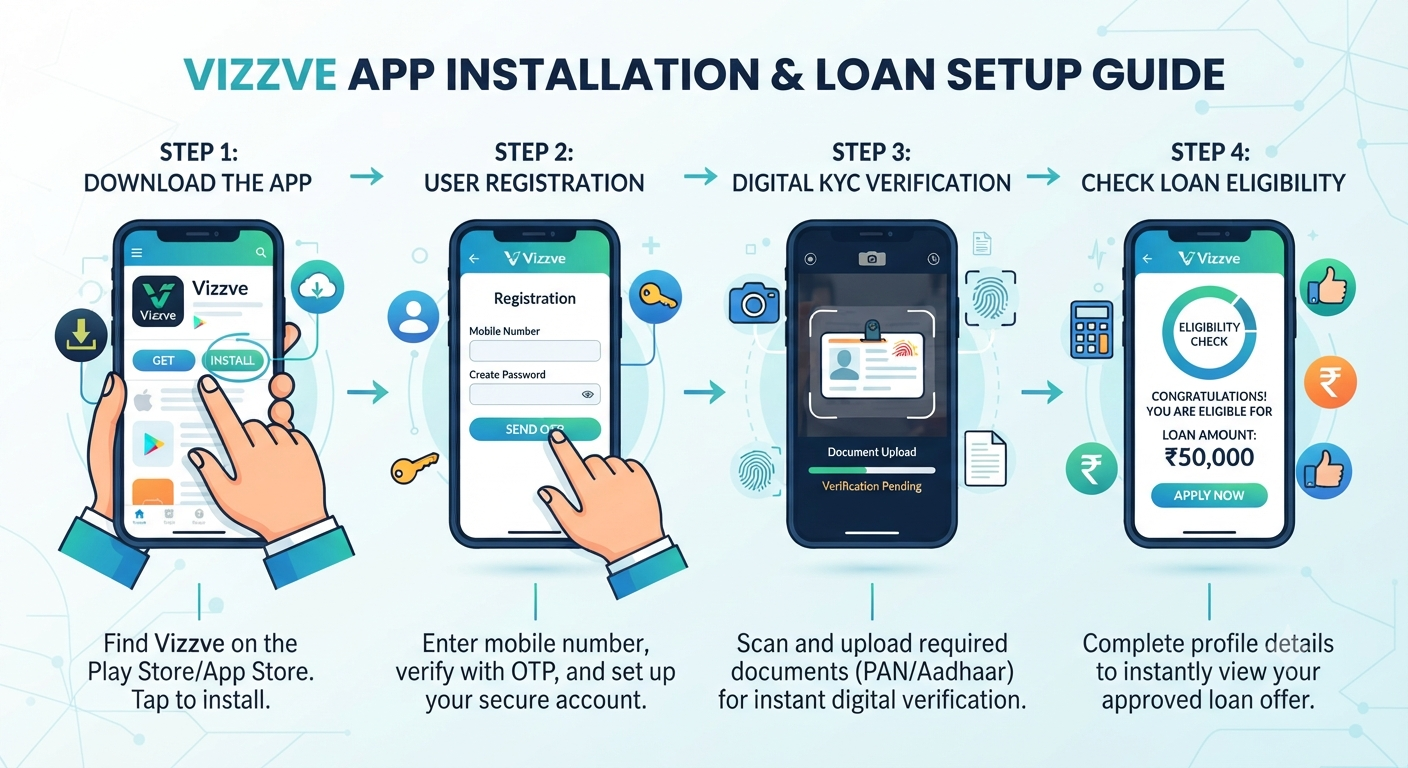
Vizzve app installation refers to downloading and setting up the official Vizzve mobile application on a compatible smartphone. It allows users to access the platform's available financial services and loan-related features.
Depending on the application, users may be able to:
-
Register using their mobile number.
-
Complete digital KYC verification.
-
Submit personal and financial information.
-
Explore available loan products.
-
Check existing loan details and repayment schedules.
-
Access payment information and account-related services.
Vizzve Financial Services provides a platform connecting borrowers with financial products offered by partner banks and NBFCs. Vizzve Microseva provides a separate microfinance-related service.
2. How to Install the Vizzve App: Step-by-Step Guide
Users should follow the correct installation process to avoid downloading unofficial or fraudulent applications.
Step 1: Visit the Official Website
Open the official Vizzve website at www.vizzve.com. Check the available application download options.
Step 2: Open the Official App Store
Depending on your smartphone, visit Google Play Store or Apple App Store. You can also follow the verified download links provided on the Vizzve website.
Step 3: Verify the Application Details
Before downloading, check the application name, developer information and official website details.
Step 4: Download and Install
Tap the Install or Get option and wait for the application to finish downloading.
Step 5: Open the Application
After installation, open the app and follow the registration instructions displayed on the screen.
Step 6: Complete Registration and Verification
Enter the requested information and complete OTP or KYC verification where applicable.
Step 7: Explore Available Services
After successful registration, explore the available loan-related features, account information and other services.
3. Eligibility Criteria for Using Vizzve Services
Eligibility requirements may differ depending on the loan product and lending partner. Generally, borrowers may need to meet the following conditions:
-
Age: Meet the minimum and maximum age requirements of the applicable lender.
-
Identity Verification: Provide valid identity and address information.
-
PAN and Aadhaar: Submit the required KYC documents.
-
Income Details: Provide salary, business income or other acceptable income information when requested.
-
Bank Account: Maintain an eligible bank account for applicable loan transactions.
-
Credit Profile: Meet the lender's credit assessment requirements.
-
Repayment Capacity: Demonstrate the ability to repay the proposed loan.
Meeting general eligibility conditions does not guarantee loan approval. Final decisions depend on the applicable lending institution's policies and verification process.
4. Documents Required for Vizzve App Registration
Depending on the service and verification requirements, users may need:
-
Aadhaar card or another accepted identity document.
-
PAN card.
-
Registered mobile number.
-
Bank account information.
-
Recent bank statements, if requested.
-
Salary slips or alternative income proof, where applicable.
-
Address information.
Users should submit documents only through verified application channels.
5. Important Features and Key Facts About Vizzve
Understanding the platform's features helps users identify which services are relevant to their requirements.
Digital Application Process: Users can access available services and complete supported application steps through their smartphones.
KYC Verification: Digital identity verification helps establish the applicant's identity.
Loan Information: Depending on the application, users can access loan offers or existing loan information.
Repayment Information: Relevant applications may provide EMI schedules, outstanding balances and payment-related details.
Financial Partner Network: Vizzve Financial facilitates access to loan products offered by partner banks and NBFCs.
Customer Support: Users can contact official support channels for application-related assistance.
An important distinction is that the Vizzve Financial app and Vizzve Microseva app serve different purposes. Users should install the application matching their intended service rather than assuming both applications have identical features.
6. Important Things to Check Before Installation
Before installing the application, consider these precautions:
-
Download only through official app-store listings or verified website links.
-
Check the developer's name before installation.
-
Avoid unofficial APK files and unknown download links.
-
Review app permissions and privacy information.
-
Never share OTPs, passwords or banking PINs.
-
Understand applicable loan charges and repayment conditions.
-
Never pay an agent or individual for guaranteed loan approval.
Vizzve's official website specifically warns users against upfront loan approval fees and payments to agents or third parties.
7. Final Thoughts
Vizzve app installation provides a digital way to access relevant financial services, loan-related information and supported application facilities. However, users should first identify the correct application, verify its developer and understand the applicable eligibility requirements.
Completing registration is only one part of the process. Loan approval depends on document verification, repayment capacity and the lending partner's assessment.
A responsible approach to app installation and borrowing can help users protect their personal information and make better financial decisions.
Frequently Asked Questions (FAQs)
1. What is Vizzve app installation?
It is the process of downloading and setting up the official Vizzve mobile application to access its available financial services.
2. Where can I download the official Vizzve app?
Visit www.vizzve.com and follow its verified Google Play Store or Apple App Store links.
3. Is KYC required after installing the Vizzve app?
KYC may be required depending on the service and loan application being accessed.
4. Who can use Vizzve services?
Eligible individuals may include salaried employees, self-employed professionals and other applicants who meet the relevant service requirements.
5. Does installing Vizzve guarantee loan approval?
No. Installation and registration do not guarantee approval. Final approval depends on the applicable lender's eligibility and verification process.
6. What documents may be required?
Commonly requested documents include PAN, Aadhaar, bank statements and income proof, depending on the application.
7. Is Vizzve Financial the same as Vizzve Microseva?
No. They are separate services with different financial offerings and application purposes.
Published on : 25th November 2026
Published by : Yogendra
www.vizzve.com || www.vizzveservices.com
Follow us on social media: Facebook || Linkedin || Instagram
🛡 Powered by Vizzve Financial
RBI-Registered Loan Partner | 10 Lakh+ Customers | ₹600 Cr+ Disbursed